Cellular vs Bluetooth: Best Devices for RPM Programs
OnCare360
Dec 26, 2025
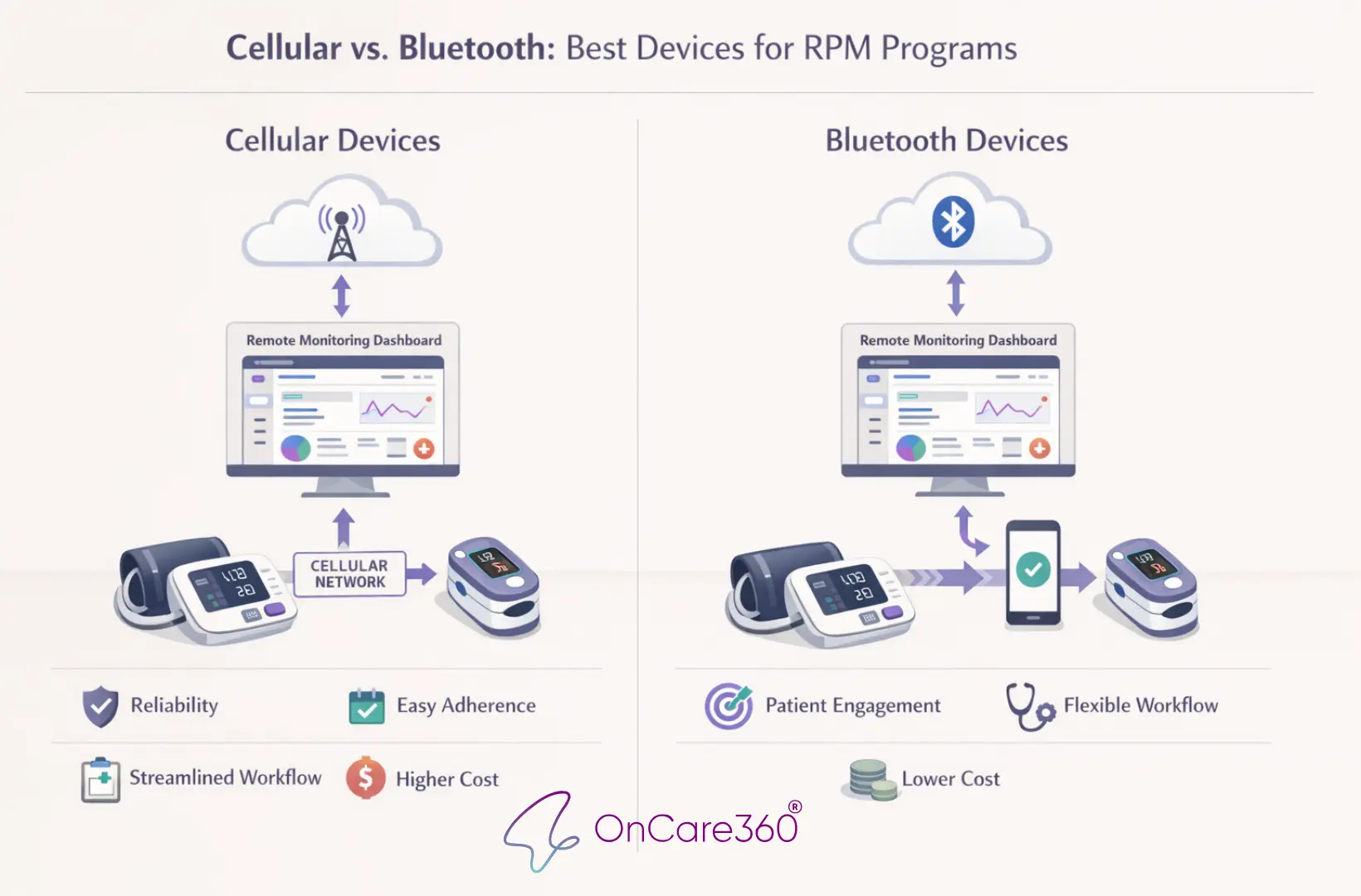
Remote Patient Monitoring (RPM) relies on devices to transmit patient health data securely and consistently. The choice between cellular and Bluetooth RPM devices directly impacts patient adherence, data reliability, and operational efficiency. Cellular devices offer plug-and-play simplicity, making them ideal for older adults and patients without reliable internet. Bluetooth devices, while more affordable upfront, require smartphones and technical setup, which can hinder compliance. This article compares these technologies, focusing on clinical workflows, patient usability, and cost considerations to help healthcare leaders optimize RPM programs for better outcomes and financial success.
How Cellular and Bluetooth RPM Devices Work
Understanding the mechanics behind cellular and Bluetooth RPM devices can guide healthcare organizations in selecting the most suitable technology for their remote patient monitoring (RPM) programs. Both options transmit critical health data to care management platforms, but they rely on distinct infrastructures and patient engagement methods. These differences play a key role in aligning device functionality with clinical goals.
Cellular RPM Devices
Cellular RPM devices simplify data transmission by leveraging built-in SIM cards that connect directly to carrier networks such as AT&T, Verizon, or T-Mobile. Using 4G LTE or 5G technology, these devices send physiological data - like blood pressure, glucose levels, oxygen saturation, and weight - straight to the care management platform without requiring additional steps from the patient. Once a reading is taken, the device automatically transmits the data via the cellular network.
This setup relies on a secure Internet of Things (IoT) infrastructure to route data seamlessly to the provider's electronic health record (EHR) or monitoring software. As Carsten Brockmann, Director of Market Strategy at Telit Cinterion, notes:
Cellular networks... are end‑to‑end secured and ready for approval and deployment right away. This is a clear win for go‑to‑market acceleration.
This approach provides a streamlined, user-friendly experience, making it an effective choice for RPM programs focused on reducing patient burden while ensuring reliable data flow.
Bluetooth RPM Devices
Bluetooth RPM devices operate differently, requiring a "bridge" device to transmit data. These devices use short-range wireless technology (typically up to 30 feet) to send readings to a smartphone, tablet, or dedicated cellular gateway. The bridge device then uploads the data to the care management platform using its own internet connection, whether through Wi-Fi or cellular data.
Patients must pair their medical device with the bridge device, often through a specific app, and may need to manually sync data by opening the app. This added complexity introduces steps like maintaining the Bluetooth connection, keeping the app updated, and ensuring a stable internet connection.
To simplify this process, some RPM programs utilize cellular gateways. These hubs collect Bluetooth signals from multiple devices - such as glucose monitors, scales, and blood pressure cuffs - and transmit the data via a single cellular connection. This reduces the workload for patients managing multiple devices, offering a more streamlined alternative when implemented effectively.
Data Integration with OnCare360
OnCare360 enhances the utility of RPM devices by processing transmitted data for clinical review, generating automated alerts, and creating Medicare-compliant documentation. The platform formats patient readings for easy review, flags abnormal vitals for immediate attention, and prepares documentation necessary for audits. For example, if a patient’s blood pressure spikes or their weight increases suddenly, the care team is notified in real time, allowing for timely intervention before the issue escalates into an emergency.
To ensure patient privacy, the system employs HIPAA-compliant encryption during both data transmission and storage, maintaining security regardless of whether cellular or Bluetooth connectivity is used. This robust integration framework supports proactive care management while adhering to regulatory standards, laying the groundwork for evaluating the performance, usability, and cost-effectiveness of each connectivity method.
Comparing Cellular and Bluetooth RPM Devices
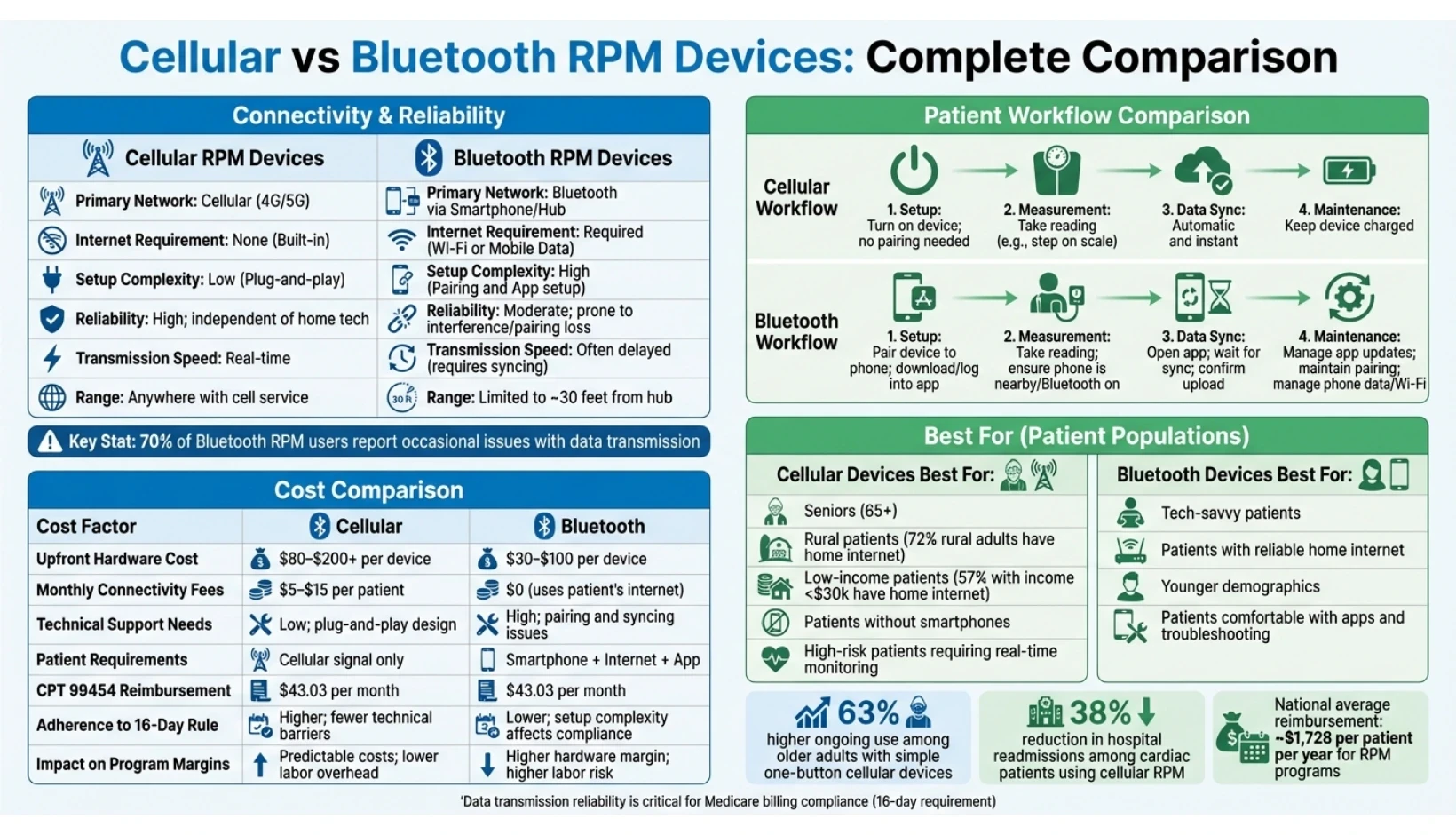
Cellular vs Bluetooth RPM Devices: Complete Comparison Guide
When deciding between cellular and Bluetooth-enabled remote patient monitoring (RPM) devices, it’s essential to weigh their performance in three key areas: network reliability, ease of use for patients, and integration into clinical workflows. These factors directly influence data quality and compliance with program requirements.
Connectivity and Reliability
Cellular devices rely on 4G or 5G networks to transmit data directly to care platforms, bypassing the need for home internet or smartphones. This setup ensures real-time data transmission, enabling immediate alerts when patient vitals deviate from safe thresholds. In contrast, Bluetooth devices depend on a smartphone or hub to relay readings, introducing potential issues like unstable pairing or the need for a constant internet connection.
As Smart Meter RPM highlights:
Cellular is also more reliable than Bluetooth in general, as it is less prone to connectivity issues.
This reliability is particularly critical for high-risk patients who require continuous monitoring. Surveys reveal that 70% of Bluetooth RPM users report occasional issues with data transmission, and 56% encounter frequent or persistent failures.
The "digital divide" further complicates Bluetooth adoption. Many Medicare beneficiaries and low-income individuals lack reliable home internet access. Cellular devices eliminate this barrier, requiring only proximity to a cellular tower, which is far more accessible than broadband in many areas.
Feature | Cellular RPM Devices | Bluetooth RPM Devices |
|---|---|---|
Primary Network | Cellular (4G/5G) | Bluetooth via Smartphone/Hub |
Internet Requirement | None (Built-in) | Required (Wi-Fi or Mobile Data) |
Setup Complexity | Low (Plug-and-play) | High (Pairing and App setup) |
Reliability | High; independent of home tech | Moderate; prone to interference/pairing loss |
Transmission Speed | Real-time | Often delayed (requires syncing) |
Range | Anywhere with cell service | Limited to ~30 feet from the hub |
These differences in connectivity significantly shape patient experiences, as discussed in the next section.
Patient Usability and Adherence
Cellular RPM devices offer a hassle-free experience: patients simply turn on the device, take a reading, and data is transmitted automatically. This simplicity is particularly important for older adults or individuals with limited digital skills, who make up a large portion of chronic disease patients in RPM programs.
Bluetooth devices, while often less expensive upfront, introduce more complexity. Lucy Lamboley, VP of Operations at Prevounce, explains:
Bluetooth can be difficult to set up and may require connections to be set up more than once if a device needs to update. Pairing issues between devices and phones may frustrate patients.
These technical challenges can discourage patients, reducing adherence. Studies support this: in March 2023, the University of Arkansas for Medical Sciences conducted a study with 12 pregnant women using cellular-enabled BodyTrace™ blood pressure cuffs and scales. Participants reported high usability scores (75.91 out of 100) and strong intentions to continue using the devices (8.73 out of 10). One participant noted that cellular transmission enabled early detection of preeclampsia, leading to timely intervention and a positive outcome.
For RPM programs to meet Medicare billing requirements, patients must submit readings for at least 16 days within a 30-day period. Cellular devices simplify this process by eliminating technical barriers that can lead to data gaps. As TimeDoc Health notes:
Cellular RPM devices excel in providing predictable, seamless functionality, standing out not just as a choice but as a strategic ally in delivering the ideal healthcare experience.
Step | Cellular Workflow | Bluetooth Workflow |
|---|---|---|
Setup | Turn on device; no pairing needed. | Pair device to phone; download/log into app. |
Measurement | Take reading (e.g., step on scale). | Take reading; ensure phone is nearby/Bluetooth on. |
Data Sync | Automatic and instant. | Open app; wait for sync; confirm upload. |
Maintenance | Keep device charged. | Manage app updates; maintain pairing; manage phone data/Wi-Fi. |
The ease of use provided by cellular devices improves adherence and ensures more consistent data submission, which is essential for timely clinical interventions.
Clinical Workflow and Alerts
The speed and reliability of data transmission directly impact how quickly care teams can respond to patient needs. Cellular devices enable real-time alerts by transmitting readings immediately after measurement. For example, if a patient’s blood pressure spikes or their weight increases suddenly, care teams receive an instant notification through platforms like OnCare360, allowing them to intervene before the situation escalates into an emergency.
Bluetooth devices, however, introduce delays. Data transmission depends on the patient opening the app and syncing their device. TimeDoc Health explains:
Bluetooth devices often require users to log into an app before submitting their data over to their provider. Providers don't get those immediate updates, and the process adds an extra step for patients to remember, which could greatly affect compliance.
These delays can hinder timely care. For instance, a heart failure patient’s unsynced weight gain might prevent early intervention, increasing the risk of hospitalization.
Cellular devices also reduce the need for technical support by eliminating pairing issues, app login problems, and home internet troubleshooting. This allows care coordinators to focus on clinical priorities rather than IT challenges, improving scalability and operational efficiency. As Samson Magid, CEO of HealthSnap, points out:
The health care professionals we serve appreciate the simplicity and reliability of this cellular blood pressure device from Smart Meter.
While platforms like OnCare360 support both device types, cellular connectivity provides smoother integration. It automates risk-based alerts, formats data for clinical review, and ensures Medicare-compliant documentation - all without requiring additional steps from patients. This automation is particularly beneficial for managing large patient panels, where even minor workflow improvements can significantly increase the number of patients a care team can monitor effectively.
For organizations involved in value-based care models or programs like TEAM and ACCESS, cellular devices offer the reliability needed for continuous monitoring and rapid response. Smart Meter RPM, which oversees 305,000 patients and processes 50 million tests annually via cellular devices, demonstrates the scalability of this approach. Moreover, national averages indicate a reimbursement potential of approximately $1,728 per patient per year for RPM programs, a figure heavily reliant on consistent data transmission and high patient adherence - areas where cellular devices excel.
Cost and Reimbursement Considerations
When selecting RPM devices, understanding the total cost of ownership is crucial for maintaining program efficiency and ensuring compliance with Medicare billing standards. While the initial hardware costs for cellular and Bluetooth devices differ, the overall expense also includes connectivity fees, technical support, and adherence to Medicare's billing requirements - all of which directly influence the program's profitability.
Device and Connectivity Costs
Bluetooth devices typically range from $30 to $100 per unit, whereas cellular devices cost between $80 and $200 or more. At first glance, Bluetooth devices may seem more economical. However, cellular devices come with monthly data fees of $5 to $15 per patient. In contrast, Bluetooth devices rely on the patient’s home internet or smartphone data plan, eliminating connectivity fees.
Additionally, practices must account for HIPAA-compliant platform fees, which range from $10 to $40 per patient per month or $100 to $500 per provider per month. Implementation and training costs can add a one-time expense of $1,000 to $10,000.
Technical support needs also factor into the overall cost. Lucy Lamboley, Vice President of Operations at Prevounce, highlights an important consideration:
Cellular-connected devices have an edge when it comes to Medicare patients... This is critical as it not only reduces the need for practices to provide ongoing technical support, but any challenges patients encounter with using an RPM device will decrease their satisfaction.
Bluetooth devices often require staff to address issues like pairing failures, syncing problems, and app-related troubleshooting. Cellular devices, with their plug-and-play functionality, minimize these challenges and reduce the need for technical support. These distinctions significantly affect the financial dynamics of RPM programs.
Impact on Program Margins
The costs associated with hardware and operations directly influence program margins and overall profitability. Medicare reimburses RPM services using the same CPT codes, regardless of the device type. For 2025, the national average reimbursement rates are as follows: CPT 99453 (initial setup and education) at $19.73, CPT 99454 (monthly device supply and data transmission) at $43.03, CPT 99457 (first 20 minutes of clinical monitoring) at $47.88, and CPT 99458 (each additional 20 minutes) at $38.50. For Federally Qualified Health Centers and Rural Health Clinics, the consolidated code G0511 reimburses $72.90.
Profitability hinges on patients meeting the 16-day transmission requirement for CPT 99454 billing. If a patient fails to transmit data on at least 16 days within a 30-day period, the practice cannot bill for that month’s device supply, turning the hardware investment into a loss. Cellular devices often achieve higher adherence rates by removing technical barriers that can lead to data gaps.
While the $43.03 CPT 99454 reimbursement covers the medical device as a direct practice expense, it does not account for software or cellular/Wi-Fi fees as separate reimbursable items. Practices must subtract cellular connectivity fees from this amount, but the reduction is often mitigated by lower labor costs and improved billing success rates due to better patient adherence. Although Bluetooth devices may provide higher hardware margins initially, those gains can be offset by increased staff time spent troubleshooting and missed billing opportunities when patients fail to sync their data.
Approximately 30% of care billed under RPM management codes (99457 and 99458) may go uncompensated due to the strict 20-minute threshold requirement, further emphasizing the need for operational efficiency to sustain program profitability.
Cost Comparison Table
The table below outlines the key cost factors for cellular and Bluetooth RPM devices and their impact on program margins:
Cost Factor | Cellular RPM Devices | Bluetooth RPM Devices |
|---|---|---|
Upfront Hardware Cost | $80–$200+ per device | $30–$100 per device |
Monthly Connectivity Fees | $5–$15 per patient | $0 (uses patient’s internet) |
Technical Support Needs | Low; plug-and-play design | High; pairing and syncing issues |
Patient Requirements | Cellular signal only | Smartphone + Internet + App |
CPT 99454 Reimbursement | $43.03 per month | $43.03 per month |
Adherence to 16‑Day Rule | Higher; fewer technical barriers | Lower; setup complexity affects compliance |
Impact on Program Margins | Predictable costs; lower labor overhead | Higher hardware margin; higher labor risk |
The financial choice between cellular and Bluetooth devices often depends on patient demographics and the scale of the program. Practices serving older adults or individuals with limited digital literacy may find cellular devices more cost-effective in the long run, despite higher upfront and connectivity costs. The reduction in technical support needs and improved billing compliance can make these devices more profitable over time. On the other hand, for tech-savvy patients where adherence is less of an issue, Bluetooth devices may offer acceptable margins with a lower initial investment.
Choosing the Right Device for Different Patient Groups
Selecting the appropriate remote patient monitoring (RPM) device requires careful consideration of patient demographics, technical skills, and connectivity options. Cellular devices are often ideal for older adults, rural communities, and individuals without access to smartphones, while Bluetooth devices suit tech-savvy patients with reliable home internet. Many successful RPM programs adopt a hybrid approach, using both types of devices to address diverse patient needs and ensure better adherence. This strategy allows practices to align device choices with specific connectivity and usability challenges.
Matching Devices to Patient Needs
Patient demographics play a central role in determining the right device. For individuals aged 65 and older, cellular devices are often the best choice due to their simplicity. Many older patients face connectivity challenges, making Bluetooth devices less practical in this group. Lucy Lamboley, Vice President of Operations at Prevounce, highlights this point:
Cellular RPM devices are easier to use for patients who might not be comfortable with hi-tech gadgets because they are ready to use out of the box with no further connection setup required.
Rural patients also benefit significantly from cellular devices, especially in areas where broadband access is limited. In 2021, only 72% of rural adults had home internet access. While cellular networks generally extend into remote areas, practices should confirm local signal strength, as satellite Wi-Fi may occasionally outperform cellular coverage in extremely remote locations.
Low-income patients face similar connectivity barriers. In 2021, just 57% of adults with household incomes below $30,000 had home internet access. Many in this group also lack smartphones, making cellular devices a more accessible option since they operate independently of home internet or additional hardware. Conversely, younger and more tech-savvy patients - those comfortable with apps and troubleshooting - can often use Bluetooth devices effectively. These devices are a cost-efficient alternative for patients who already have the necessary technology. The choice of device directly influences data reliability, patient adherence, and overall program success.
Using Both Device Types in One Program
A hybrid model that combines cellular and Bluetooth devices offers flexibility and cost management while maintaining high adherence rates across patient groups. Lucy Lamboley explains:
Many practices have found success in offering a mix of connectivity options. Bluetooth devices deliver noteworthy advantages and may be worth offering to tech-savvy patients while defaulting to cellular devices.
Platforms like OnCare360 support this approach by integrating data from both device types into a single clinical workflow. This unified system allows practices to assign Bluetooth devices to patients capable of managing pairing and syncing, while reserving cellular devices for those who may struggle with technical setup. Additionally, intergenerational support within families can help patients overcome technical hurdles. Device selection should reflect both individual patient needs and the broader goals of the RPM program.
Aligning Device Selection with RPM Goals
Choosing the right device is critical for achieving RPM program goals, including scalability, compliance, and improved patient outcomes. Cellular devices simplify technical support, which is essential for scalability. Approximately 70% of Bluetooth users experience issues transmitting health readings, potentially delaying timely interventions.
For compliance, cellular devices excel due to their ease of use. A 2023 study found that simple one-button cellular devices led to 63% higher ongoing use among older adults compared to more complex systems. This increased adherence supports billing success and enhances program efficiency.
In terms of patient outcomes, cellular devices enable real-time data transmission, allowing for faster clinical responses. This capability has been shown to reduce hospital readmissions by 38% among cardiac patients. For practices focused on value-based care, prioritizing devices that ensure data accuracy and minimize monitoring gaps is essential for meeting quality metrics and achieving shared savings targets.
Conclusion
Selecting the right devices for Remote Patient Monitoring (RPM) programs requires careful consideration of patient needs and program objectives. Cellular devices often provide higher reliability and adherence, making them well-suited for seniors, rural populations, and patients without dependable internet access. On the other hand, Bluetooth devices can be a more cost-effective option for tech-savvy users who are comfortable with pairing and syncing. A balanced strategy - defaulting to cellular devices for patients with connectivity challenges while offering Bluetooth options where appropriate - can help optimize both patient engagement and program cost-efficiency.
The importance of ease of use cannot be overstated. Studies indicate that around 70% of Bluetooth RPM users encounter connectivity issues, and many seniors lack reliable home internet, reinforcing the case for cellular devices. Lucy Lamboley, Vice President of Operations at Prevounce, highlights this advantage:
The cellular option will help create a proactive healthcare relationship between patients and their practitioners, which will ultimately enhance wellness and revenue.
While patient engagement is critical, seamless integration into existing clinical workflows is equally essential. TimeDoc Health underscores this point:
if data isn't put into an EHR, the chances that a provider will use it go down drastically. It could get lost in the shuffle or simply missed since it won't be top-of-mind in the doctor's medical software
To address this, platforms like OnCare360 combine data from both cellular and Bluetooth devices, ensuring smooth workflows and real-time data transmission. This integration supports Medicare compliance, real-time alerts, and the ability to manage diverse patient populations within a single system.
Ultimately, device selection should focus on three key priorities: reducing technical barriers, improving adherence, and ensuring automatic data capture for reimbursement. As Life365 emphasizes:
clinicians should not be burdened with connectivity issues, complex patient setup, providing extensive technical support, or being experts in device troubleshooting
FAQs
What are the key benefits of using cellular devices for remote patient monitoring (RPM) compared to Bluetooth devices?
Cellular RPM devices stand out compared to Bluetooth options because they work independently of a patient’s smartphone, Wi-Fi, or any additional equipment. This independence simplifies the process for patients, particularly older adults, rural residents, or those in households lacking reliable internet or technical know-how.
Another key advantage is their ease of setup and reliability. Equipped with just a SIM card and a data plan, these devices are simple to deploy, even for users with minimal tech skills. Cellular networks ensure consistent data transmission and broader coverage, avoiding the range and interference issues often associated with Bluetooth. These qualities make cellular RPM devices a more reliable and user-friendly solution for scaling RPM programs effectively.
How do cellular RPM devices improve patient adherence and data accuracy?
Cellular RPM devices streamline the patient experience by connecting directly to cellular networks, much like a mobile phone. This eliminates the need for Wi-Fi, smartphones, or tablets, making them particularly accessible for older adults, individuals in rural areas, or anyone less familiar with technology. By bypassing common challenges like Bluetooth pairing or unreliable internet connections, these devices promote consistent use, which supports better patient adherence.
When it comes to data accuracy, cellular devices provide a more stable connection compared to Bluetooth options. They are less prone to interference or disruptions caused by poor home Wi-Fi quality, ensuring that critical health data is transmitted reliably and without interruption. This steady flow of information empowers clinicians to make timely and precise decisions, improving the overall impact of remote patient monitoring programs.
What should healthcare providers consider when choosing between cellular and Bluetooth devices for RPM programs?
When deciding between cellular and Bluetooth devices for remote patient monitoring (RPM), it’s essential to weigh factors like patient accessibility and ease of use. Cellular devices are particularly helpful for patients who don’t have access to smartphones, Wi-Fi, or the technical know-how to navigate setup processes. These devices operate independently, requiring no pairing or configuration, which can enhance patient compliance and minimize the need for technical assistance.
Connectivity and reliability are equally important considerations. Cellular devices leverage mobile networks, providing dependable performance and extensive coverage - even for patients who are frequently on the move or live in areas with inconsistent Wi-Fi. In contrast, Bluetooth devices depend on staying near a paired smartphone, which can result in interruptions due to interference or connection issues.
Finally, it’s crucial to assess costs and operational efficiency. Cellular devices often come with higher recurring expenses tied to data plans, but they streamline operations by eliminating the need for extra apps or pairing processes. Bluetooth devices, while typically less expensive upfront, might increase support demands if patients face connectivity problems. By carefully balancing these aspects, providers can select the most suitable option to optimize their RPM programs.
Cellular vs Bluetooth RPM Devices: Complete Comparison Guide
When deciding between cellular and Bluetooth-enabled remote patient monitoring (RPM) devices, it’s essential to weigh their performance in three key areas: network reliability, ease of use for patients, and integration into clinical workflows. These factors directly influence data quality and compliance with program requirements.
Connectivity and Reliability
Cellular devices rely on 4G or 5G networks to transmit data directly to care platforms, bypassing the need for home internet or smartphones. This setup ensures real-time data transmission, enabling immediate alerts when patient vitals deviate from safe thresholds. In contrast, Bluetooth devices depend on a smartphone or hub to relay readings, introducing potential issues like unstable pairing or the need for a constant internet connection.
As Smart Meter RPM highlights:
Cellular is also more reliable than Bluetooth in general, as it is less prone to connectivity issues.
This reliability is particularly critical for high-risk patients who require continuous monitoring. Surveys reveal that 70% of Bluetooth RPM users report occasional issues with data transmission, and 56% encounter frequent or persistent failures.
The "digital divide" further complicates Bluetooth adoption. Many Medicare beneficiaries and low-income individuals lack reliable home internet access. Cellular devices eliminate this barrier, requiring only proximity to a cellular tower, which is far more accessible than broadband in many areas.
Feature | Cellular RPM Devices | Bluetooth RPM Devices |
|---|---|---|
Primary Network | Cellular (4G/5G) | Bluetooth via Smartphone/Hub |
Internet Requirement | None (Built-in) | Required (Wi-Fi or Mobile Data) |
Setup Complexity | Low (Plug-and-play) | High (Pairing and App setup) |
Reliability | High; independent of home tech | Moderate; prone to interference/pairing loss |
Transmission Speed | Real-time | Often delayed (requires syncing) |
Range | Anywhere with cell service | Limited to ~30 feet from the hub |
These differences in connectivity significantly shape patient experiences, as discussed in the next section.
Patient Usability and Adherence
Cellular RPM devices offer a hassle-free experience: patients simply turn on the device, take a reading, and data is transmitted automatically. This simplicity is particularly important for older adults or individuals with limited digital skills, who make up a large portion of chronic disease patients in RPM programs.
Bluetooth devices, while often less expensive upfront, introduce more complexity. Lucy Lamboley, VP of Operations at Prevounce, explains:
Bluetooth can be difficult to set up and may require connections to be set up more than once if a device needs to update. Pairing issues between devices and phones may frustrate patients.
These technical challenges can discourage patients, reducing adherence. Studies support this: in March 2023, the University of Arkansas for Medical Sciences conducted a study with 12 pregnant women using cellular-enabled BodyTrace™ blood pressure cuffs and scales. Participants reported high usability scores (75.91 out of 100) and strong intentions to continue using the devices (8.73 out of 10). One participant noted that cellular transmission enabled early detection of preeclampsia, leading to timely intervention and a positive outcome.
For RPM programs to meet Medicare billing requirements, patients must submit readings for at least 16 days within a 30-day period. Cellular devices simplify this process by eliminating technical barriers that can lead to data gaps. As TimeDoc Health notes:
Cellular RPM devices excel in providing predictable, seamless functionality, standing out not just as a choice but as a strategic ally in delivering the ideal healthcare experience.
Step | Cellular Workflow | Bluetooth Workflow |
|---|---|---|
Setup | Turn on device; no pairing needed. | Pair device to phone; download/log into app. |
Measurement | Take reading (e.g., step on scale). | Take reading; ensure phone is nearby/Bluetooth on. |
Data Sync | Automatic and instant. | Open app; wait for sync; confirm upload. |
Maintenance | Keep device charged. | Manage app updates; maintain pairing; manage phone data/Wi-Fi. |
The ease of use provided by cellular devices improves adherence and ensures more consistent data submission, which is essential for timely clinical interventions.
Clinical Workflow and Alerts
The speed and reliability of data transmission directly impact how quickly care teams can respond to patient needs. Cellular devices enable real-time alerts by transmitting readings immediately after measurement. For example, if a patient’s blood pressure spikes or their weight increases suddenly, care teams receive an instant notification through platforms like OnCare360, allowing them to intervene before the situation escalates into an emergency.
Bluetooth devices, however, introduce delays. Data transmission depends on the patient opening the app and syncing their device. TimeDoc Health explains:
Bluetooth devices often require users to log into an app before submitting their data over to their provider. Providers don't get those immediate updates, and the process adds an extra step for patients to remember, which could greatly affect compliance.
These delays can hinder timely care. For instance, a heart failure patient’s unsynced weight gain might prevent early intervention, increasing the risk of hospitalization.
Cellular devices also reduce the need for technical support by eliminating pairing issues, app login problems, and home internet troubleshooting. This allows care coordinators to focus on clinical priorities rather than IT challenges, improving scalability and operational efficiency. As Samson Magid, CEO of HealthSnap, points out:
The health care professionals we serve appreciate the simplicity and reliability of this cellular blood pressure device from Smart Meter.
While platforms like OnCare360 support both device types, cellular connectivity provides smoother integration. It automates risk-based alerts, formats data for clinical review, and ensures Medicare-compliant documentation - all without requiring additional steps from patients. This automation is particularly beneficial for managing large patient panels, where even minor workflow improvements can significantly increase the number of patients a care team can monitor effectively.
For organizations involved in value-based care models or programs like TEAM and ACCESS, cellular devices offer the reliability needed for continuous monitoring and rapid response. Smart Meter RPM, which oversees 305,000 patients and processes 50 million tests annually via cellular devices, demonstrates the scalability of this approach. Moreover, national averages indicate a reimbursement potential of approximately $1,728 per patient per year for RPM programs, a figure heavily reliant on consistent data transmission and high patient adherence - areas where cellular devices excel.
Cost and Reimbursement Considerations
When selecting RPM devices, understanding the total cost of ownership is crucial for maintaining program efficiency and ensuring compliance with Medicare billing standards. While the initial hardware costs for cellular and Bluetooth devices differ, the overall expense also includes connectivity fees, technical support, and adherence to Medicare's billing requirements - all of which directly influence the program's profitability.
Device and Connectivity Costs
Bluetooth devices typically range from $30 to $100 per unit, whereas cellular devices cost between $80 and $200 or more. At first glance, Bluetooth devices may seem more economical. However, cellular devices come with monthly data fees of $5 to $15 per patient. In contrast, Bluetooth devices rely on the patient’s home internet or smartphone data plan, eliminating connectivity fees.
Additionally, practices must account for HIPAA-compliant platform fees, which range from $10 to $40 per patient per month or $100 to $500 per provider per month. Implementation and training costs can add a one-time expense of $1,000 to $10,000.
Technical support needs also factor into the overall cost. Lucy Lamboley, Vice President of Operations at Prevounce, highlights an important consideration:
Cellular-connected devices have an edge when it comes to Medicare patients... This is critical as it not only reduces the need for practices to provide ongoing technical support, but any challenges patients encounter with using an RPM device will decrease their satisfaction.
Bluetooth devices often require staff to address issues like pairing failures, syncing problems, and app-related troubleshooting. Cellular devices, with their plug-and-play functionality, minimize these challenges and reduce the need for technical support. These distinctions significantly affect the financial dynamics of RPM programs.
Impact on Program Margins
The costs associated with hardware and operations directly influence program margins and overall profitability. Medicare reimburses RPM services using the same CPT codes, regardless of the device type. For 2025, the national average reimbursement rates are as follows: CPT 99453 (initial setup and education) at $19.73, CPT 99454 (monthly device supply and data transmission) at $43.03, CPT 99457 (first 20 minutes of clinical monitoring) at $47.88, and CPT 99458 (each additional 20 minutes) at $38.50. For Federally Qualified Health Centers and Rural Health Clinics, the consolidated code G0511 reimburses $72.90.
Profitability hinges on patients meeting the 16-day transmission requirement for CPT 99454 billing. If a patient fails to transmit data on at least 16 days within a 30-day period, the practice cannot bill for that month’s device supply, turning the hardware investment into a loss. Cellular devices often achieve higher adherence rates by removing technical barriers that can lead to data gaps.
While the $43.03 CPT 99454 reimbursement covers the medical device as a direct practice expense, it does not account for software or cellular/Wi-Fi fees as separate reimbursable items. Practices must subtract cellular connectivity fees from this amount, but the reduction is often mitigated by lower labor costs and improved billing success rates due to better patient adherence. Although Bluetooth devices may provide higher hardware margins initially, those gains can be offset by increased staff time spent troubleshooting and missed billing opportunities when patients fail to sync their data.
Approximately 30% of care billed under RPM management codes (99457 and 99458) may go uncompensated due to the strict 20-minute threshold requirement, further emphasizing the need for operational efficiency to sustain program profitability.
Cost Comparison Table
The table below outlines the key cost factors for cellular and Bluetooth RPM devices and their impact on program margins:
Cost Factor | Cellular RPM Devices | Bluetooth RPM Devices |
|---|---|---|
Upfront Hardware Cost | $80–$200+ per device | $30–$100 per device |
Monthly Connectivity Fees | $5–$15 per patient | $0 (uses patient’s internet) |
Technical Support Needs | Low; plug-and-play design | High; pairing and syncing issues |
Patient Requirements | Cellular signal only | Smartphone + Internet + App |
CPT 99454 Reimbursement | $43.03 per month | $43.03 per month |
Adherence to 16‑Day Rule | Higher; fewer technical barriers | Lower; setup complexity affects compliance |
Impact on Program Margins | Predictable costs; lower labor overhead | Higher hardware margin; higher labor risk |
The financial choice between cellular and Bluetooth devices often depends on patient demographics and the scale of the program. Practices serving older adults or individuals with limited digital literacy may find cellular devices more cost-effective in the long run, despite higher upfront and connectivity costs. The reduction in technical support needs and improved billing compliance can make these devices more profitable over time. On the other hand, for tech-savvy patients where adherence is less of an issue, Bluetooth devices may offer acceptable margins with a lower initial investment.
Choosing the Right Device for Different Patient Groups
Selecting the appropriate remote patient monitoring (RPM) device requires careful consideration of patient demographics, technical skills, and connectivity options. Cellular devices are often ideal for older adults, rural communities, and individuals without access to smartphones, while Bluetooth devices suit tech-savvy patients with reliable home internet. Many successful RPM programs adopt a hybrid approach, using both types of devices to address diverse patient needs and ensure better adherence. This strategy allows practices to align device choices with specific connectivity and usability challenges.
Matching Devices to Patient Needs
Patient demographics play a central role in determining the right device. For individuals aged 65 and older, cellular devices are often the best choice due to their simplicity. Many older patients face connectivity challenges, making Bluetooth devices less practical in this group. Lucy Lamboley, Vice President of Operations at Prevounce, highlights this point:
Cellular RPM devices are easier to use for patients who might not be comfortable with hi-tech gadgets because they are ready to use out of the box with no further connection setup required.
Rural patients also benefit significantly from cellular devices, especially in areas where broadband access is limited. In 2021, only 72% of rural adults had home internet access. While cellular networks generally extend into remote areas, practices should confirm local signal strength, as satellite Wi-Fi may occasionally outperform cellular coverage in extremely remote locations.
Low-income patients face similar connectivity barriers. In 2021, just 57% of adults with household incomes below $30,000 had home internet access. Many in this group also lack smartphones, making cellular devices a more accessible option since they operate independently of home internet or additional hardware. Conversely, younger and more tech-savvy patients - those comfortable with apps and troubleshooting - can often use Bluetooth devices effectively. These devices are a cost-efficient alternative for patients who already have the necessary technology. The choice of device directly influences data reliability, patient adherence, and overall program success.
Using Both Device Types in One Program
A hybrid model that combines cellular and Bluetooth devices offers flexibility and cost management while maintaining high adherence rates across patient groups. Lucy Lamboley explains:
Many practices have found success in offering a mix of connectivity options. Bluetooth devices deliver noteworthy advantages and may be worth offering to tech-savvy patients while defaulting to cellular devices.
Platforms like OnCare360 support this approach by integrating data from both device types into a single clinical workflow. This unified system allows practices to assign Bluetooth devices to patients capable of managing pairing and syncing, while reserving cellular devices for those who may struggle with technical setup. Additionally, intergenerational support within families can help patients overcome technical hurdles. Device selection should reflect both individual patient needs and the broader goals of the RPM program.
Aligning Device Selection with RPM Goals
Choosing the right device is critical for achieving RPM program goals, including scalability, compliance, and improved patient outcomes. Cellular devices simplify technical support, which is essential for scalability. Approximately 70% of Bluetooth users experience issues transmitting health readings, potentially delaying timely interventions.
For compliance, cellular devices excel due to their ease of use. A 2023 study found that simple one-button cellular devices led to 63% higher ongoing use among older adults compared to more complex systems. This increased adherence supports billing success and enhances program efficiency.
In terms of patient outcomes, cellular devices enable real-time data transmission, allowing for faster clinical responses. This capability has been shown to reduce hospital readmissions by 38% among cardiac patients. For practices focused on value-based care, prioritizing devices that ensure data accuracy and minimize monitoring gaps is essential for meeting quality metrics and achieving shared savings targets.
Conclusion
Selecting the right devices for Remote Patient Monitoring (RPM) programs requires careful consideration of patient needs and program objectives. Cellular devices often provide higher reliability and adherence, making them well-suited for seniors, rural populations, and patients without dependable internet access. On the other hand, Bluetooth devices can be a more cost-effective option for tech-savvy users who are comfortable with pairing and syncing. A balanced strategy - defaulting to cellular devices for patients with connectivity challenges while offering Bluetooth options where appropriate - can help optimize both patient engagement and program cost-efficiency.
The importance of ease of use cannot be overstated. Studies indicate that around 70% of Bluetooth RPM users encounter connectivity issues, and many seniors lack reliable home internet, reinforcing the case for cellular devices. Lucy Lamboley, Vice President of Operations at Prevounce, highlights this advantage:
The cellular option will help create a proactive healthcare relationship between patients and their practitioners, which will ultimately enhance wellness and revenue.
While patient engagement is critical, seamless integration into existing clinical workflows is equally essential. TimeDoc Health underscores this point:
if data isn't put into an EHR, the chances that a provider will use it go down drastically. It could get lost in the shuffle or simply missed since it won't be top-of-mind in the doctor's medical software
To address this, platforms like OnCare360 combine data from both cellular and Bluetooth devices, ensuring smooth workflows and real-time data transmission. This integration supports Medicare compliance, real-time alerts, and the ability to manage diverse patient populations within a single system.
Ultimately, device selection should focus on three key priorities: reducing technical barriers, improving adherence, and ensuring automatic data capture for reimbursement. As Life365 emphasizes:
clinicians should not be burdened with connectivity issues, complex patient setup, providing extensive technical support, or being experts in device troubleshooting
FAQs
What are the key benefits of using cellular devices for remote patient monitoring (RPM) compared to Bluetooth devices?
Cellular RPM devices stand out compared to Bluetooth options because they work independently of a patient’s smartphone, Wi-Fi, or any additional equipment. This independence simplifies the process for patients, particularly older adults, rural residents, or those in households lacking reliable internet or technical know-how.
Another key advantage is their ease of setup and reliability. Equipped with just a SIM card and a data plan, these devices are simple to deploy, even for users with minimal tech skills. Cellular networks ensure consistent data transmission and broader coverage, avoiding the range and interference issues often associated with Bluetooth. These qualities make cellular RPM devices a more reliable and user-friendly solution for scaling RPM programs effectively.
How do cellular RPM devices improve patient adherence and data accuracy?
Cellular RPM devices streamline the patient experience by connecting directly to cellular networks, much like a mobile phone. This eliminates the need for Wi-Fi, smartphones, or tablets, making them particularly accessible for older adults, individuals in rural areas, or anyone less familiar with technology. By bypassing common challenges like Bluetooth pairing or unreliable internet connections, these devices promote consistent use, which supports better patient adherence.
When it comes to data accuracy, cellular devices provide a more stable connection compared to Bluetooth options. They are less prone to interference or disruptions caused by poor home Wi-Fi quality, ensuring that critical health data is transmitted reliably and without interruption. This steady flow of information empowers clinicians to make timely and precise decisions, improving the overall impact of remote patient monitoring programs.
What should healthcare providers consider when choosing between cellular and Bluetooth devices for RPM programs?
When deciding between cellular and Bluetooth devices for remote patient monitoring (RPM), it’s essential to weigh factors like patient accessibility and ease of use. Cellular devices are particularly helpful for patients who don’t have access to smartphones, Wi-Fi, or the technical know-how to navigate setup processes. These devices operate independently, requiring no pairing or configuration, which can enhance patient compliance and minimize the need for technical assistance.
Connectivity and reliability are equally important considerations. Cellular devices leverage mobile networks, providing dependable performance and extensive coverage - even for patients who are frequently on the move or live in areas with inconsistent Wi-Fi. In contrast, Bluetooth devices depend on staying near a paired smartphone, which can result in interruptions due to interference or connection issues.
Finally, it’s crucial to assess costs and operational efficiency. Cellular devices often come with higher recurring expenses tied to data plans, but they streamline operations by eliminating the need for extra apps or pairing processes. Bluetooth devices, while typically less expensive upfront, might increase support demands if patients face connectivity problems. By carefully balancing these aspects, providers can select the most suitable option to optimize their RPM programs.
Jan 5, 2026
CMS Updates: How RPM is changing in 2026
Jan 3, 2026
How AI Expands Care Coordinator Capacity
Jan 1, 2026
RPM Time Tracking Errors That Lead to Denials
Dec 31, 2025
CMS Consent Documentation: What Must Be Captured
Jan 5, 2026
CMS Updates: How RPM is changing in 2026
Jan 3, 2026
How AI Expands Care Coordinator Capacity
Jan 1, 2026
RPM Time Tracking Errors That Lead to Denials
Dec 31, 2025
CMS Consent Documentation: What Must Be Captured
Dec 30, 2025
Top 10 Documentation Errors in CCM & RPM
Dec 29, 2025
Audit-Ready Documentation: What CMS Expects
Jan 5, 2026
CMS Updates: How RPM is changing in 2026
Jan 3, 2026
How AI Expands Care Coordinator Capacity
Jan 1, 2026
RPM Time Tracking Errors That Lead to Denials
Dec 31, 2025
CMS Consent Documentation: What Must Be Captured
Dec 30, 2025
Top 10 Documentation Errors in CCM & RPM
Dec 29, 2025
Audit-Ready Documentation: What CMS Expects


Have questions?
Are you ready to explore the future of healthcare with OnCare360?
Contact us for more information or request a free consultation today.
Have questions?
Are you ready to explore the future of healthcare with OnCare360?
Contact us for more information or request a free consultation today.
Have questions?
Are you ready to explore the future of healthcare with OnCare360?
Contact us for more information or request a free consultation today.
Have questions?
Are you ready to explore the future of healthcare with OnCare360?
Contact us for more information or request a free consultation today.
Have questions?
Are you ready to explore the future of healthcare with OnCare360?
Contact us for more information or request a free consultation today.
Have questions?