CMS Consent Documentation: What Must Be Captured
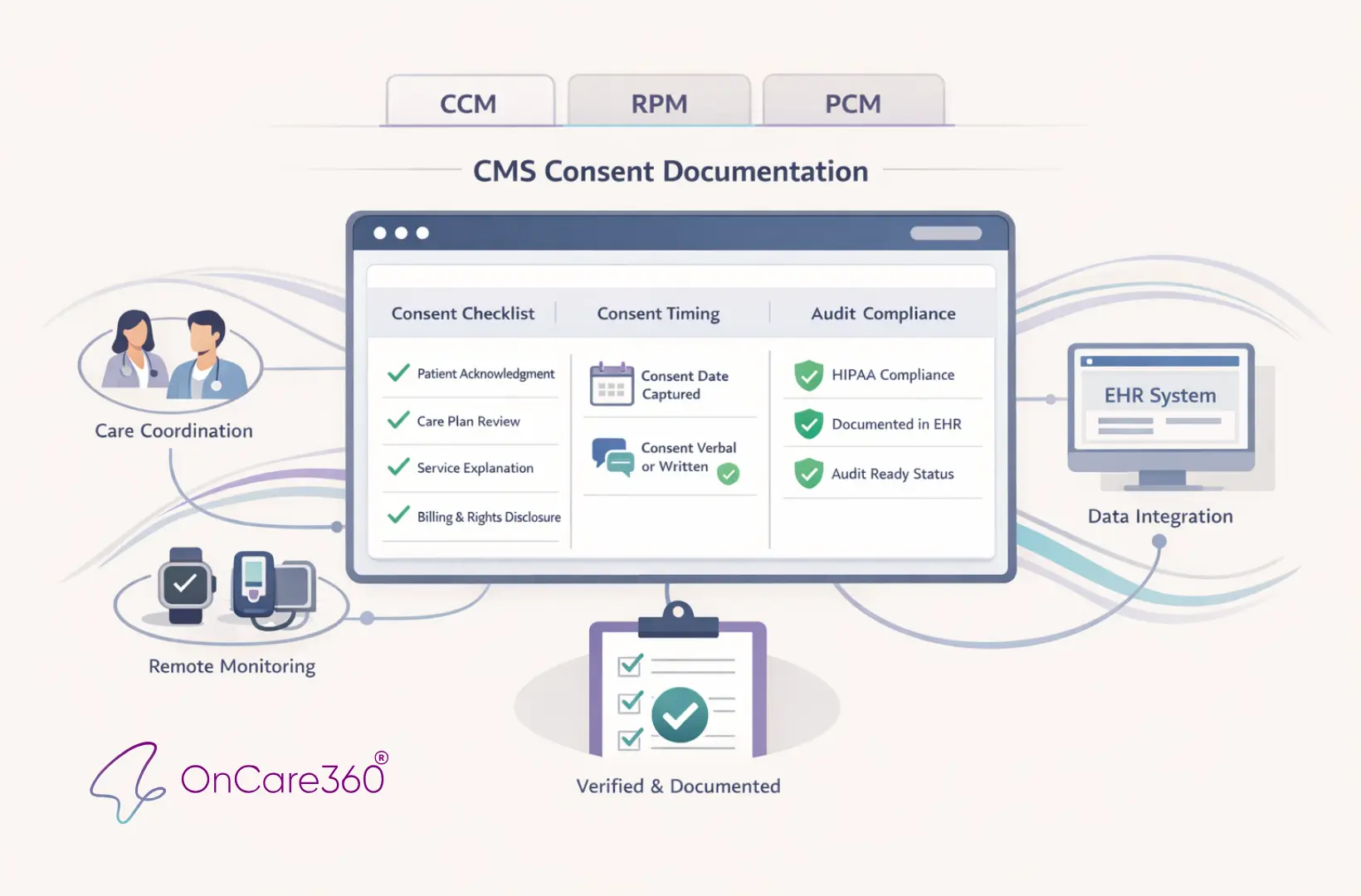
CMS Consent Documentation: What Must Be Captured

OnCare360

Dec 31, 2025

CMS consent documentation is a critical requirement for billing Chronic Care Management (CCM), Remote Patient Monitoring (RPM), and Principal Care Management (PCM) services. Without accurate and complete consent, practices risk claim denials, audits, and lost revenue. This article outlines the four required elements for CMS-compliant consent, operational challenges, and strategies to ensure proper documentation.

Physician groups, practice administrators, and value-based care leaders face significant financial and compliance risks if consent forms are incomplete or non-compliant. For example, a single CCM patient can generate over $1,100 annually, but errors in consent documentation can jeopardize reimbursement. The article provides actionable steps to meet CMS standards, avoid legal exposure, and streamline workflows for audit readiness.

Readers will learn:

  • The four key elements CMS requires for compliant consent

  • Differences in consent rules for CCM, RPM, and PCM programs

  • Best practices for verbal vs. written consent documentation

  • How tools like OnCare360 simplify compliance and audit preparation

Required Elements for CMS-Compliant Consent Documentation

To meet CMS compliance standards, consent documentation must include four key elements: a description of the available services, details on cost-sharing, confirmation that only one provider can bill per month, and acknowledgment of the patient’s right to stop services. These elements must be recorded in the EHR prior to billing, ensuring both compliance and readiness for audits.

Elizabeth Bradford Kneeland, MBA, clarifies the requirements:

The form must spell out program benefits and clinical contact information for the 24/7 care team access. It must state in clear language that participation is voluntary, and there may be out of pocket cost sharing for the patient.

Whether consent is verbal or written, it must document that the patient was informed about the program, understood their financial obligations, acknowledged the single-provider-per-month rule, and was made aware of their right to discontinue services.

Below, each element is explored in detail to guide the creation of audit-ready documentation.

Informing Patients About Available Services

It’s essential to document that patients were informed about the care management program, including specific services like 24/7 access to care, medication management, appointment scheduling, guidance on medication use, and post-hospital follow-up. The explanation should match the actual conversation with the patient.

Corella Lumpkins, a National Advisory Board Member at AAPC, advises:

The summary of the benefits of a CCM program should describe offered services such as: Assistance with scheduling appointments... Guidance for how and when to take medications... [and] Coordination of follow-up care after leaving the hospital.

Be sure to record the date and method of communication in the EHR, noting whether a printed or digital summary was provided to the patient.

Explaining Patient Out-of-Pocket Costs

Patients must be informed about potential costs, including a 20% Medicare coinsurance and applicable deductibles. These cost-sharing requirements apply even for non-face-to-face services. Consent regarding these costs needs to be obtained only once, before services begin. For verbal consent, document in the EHR that the patient acknowledged the costs and agreed to proceed. Additionally, check if the patient qualifies as a Qualified Medicare Beneficiary (QMB), as they may be exempt from these costs. For context, CCM programs save Medicare approximately $74 per patient per month - or $888 annually.

One Provider Per Month Rule

Documentation must clearly state that only one provider can bill for CCM services during a given calendar month. This rule is critical to avoid claim disputes. If two providers submit claims for the same patient in the same month, the claim tied to the consent recorded earlier typically takes precedence. Ask patients if they are currently enrolled with another provider, and document their response. If the patient is switching providers, record the formal revocation of consent with the previous provider to ensure proper billing eligibility for the next month.

Patient's Right to Stop Services

Patients must be informed that they can opt out of the care management program at any time. The revocation becomes effective at the end of the current calendar month. Since CCM consent remains valid until revoked, document both the date of the patient’s request to stop services and the effective date for billing purposes. Ensure the documentation emphasizes that participation is voluntary and withdrawal is allowed at any time.

How to Capture Patient Consent Correctly

When enrolling patients in care management programs, the Centers for Medicare & Medicaid Services (CMS) allows for both verbal and written consent. However, the method you choose can directly influence the clarity of your documentation and your preparedness for audits. Regardless of the format, it's crucial to document the consent in the patient’s medical record before billing. This record must clearly show that all required elements were addressed.

Verbal vs. Written Consent

Verbal consent meets CMS’s minimum requirements for programs like Chronic Care Management (CCM), Remote Patient Monitoring (RPM), and Principal Care Management (PCM). It can be obtained and documented by the billing practitioner or auxiliary staff working under their general supervision. Importantly, the medical record must include a detailed note confirming that the patient was informed about all four required elements:

  • The services available under the program

  • Cost-sharing obligations

  • The one-provider-per-month rule

  • The patient’s right to discontinue services at any time

Corella Lumpkins, an expert from AAPC, emphasizes the importance of thorough consent practices:

Verbal consent is required to enroll patients in the CCM program; however, obtaining written consent is best practice, as is giving the patient a copy of the consent form.

Written consent, on the other hand, offers stronger legal protection and simplifies audit processes. For formal consent under 42 CFR Part 2, it must include specific details such as the patient’s name, authorized individuals, a description of the information disclosed with its purpose, an expiration date or event, and the patient’s signature. Electronic signatures are acceptable unless restricted by local laws. Additionally, providing a physical or digital copy of the signed consent form to the patient is recommended for transparency.

After selecting the consent method, promptly document all relevant details in the electronic health record (EHR) to ensure compliance.

When and Where to Document Consent

Consent should be recorded in the patient’s EHR either at the time services are initiated or before billing occurs. Key details to document include the date of consent and the patient’s decision to enroll. For services like Virtual Check-ins or Communication Technology-Based Services, a single consent can cover a full year. For CCM, the consent remains valid until the patient either revokes it or transitions to a different provider.

Using EHR systems with automated time-stamping is highly beneficial, as it captures the exact date and time of the consent interaction, creating a clear audit trail. If the consent pertains to Substance Use Disorder counseling, it must be captured as a separate written consent and cannot be combined with other medical consents. Additionally, always document whether the patient was provided with a printed or digital summary of the services, as this confirms they were fully informed before agreeing to participate.

How OnCare360 Simplifies Audit-Ready Documentation

Creating audit-ready consent documentation requires structured workflows that ensure all necessary elements are captured, interactions are timestamped, and records are stored in a verifiable format. OnCare360 streamlines this process by automating consent capture and embedding compliance safeguards to minimize the risk of missing documentation. This approach is rooted in established practices for efficient and accurate consent management.

Automated Consent Capture

OnCare360 integrates workflows designed to document all four required CMS consent elements before submitting claims. The platform prompts care coordinators to verify that each of these elements has been completed. By capturing each element as a distinct field within the electronic medical record, OnCare360 reduces the likelihood of errors or omissions that can arise with free-text entries. Additionally, the system automatically logs the date of consent and the patient’s response, ensuring adherence to CMS guidelines.

Time-Stamped Records and Witness Documentation

Beyond capturing consent, OnCare360 timestamps every interaction, creating a reliable audit trail. CMS mandates that consent records be retained for at least 10 years. For oral consent provided via a short form, a witness signature is required on both the form and a summary. OnCare360 addresses this requirement by supporting witness documentation and electronic signatures. The platform also records the care coordinator’s name to meet CMS’s identification requirements. These features collectively strengthen the platform’s alignment with CMS compliance standards, as highlighted throughout this guide.
Consent Requirements for CCM, RPM, and PCM Programs


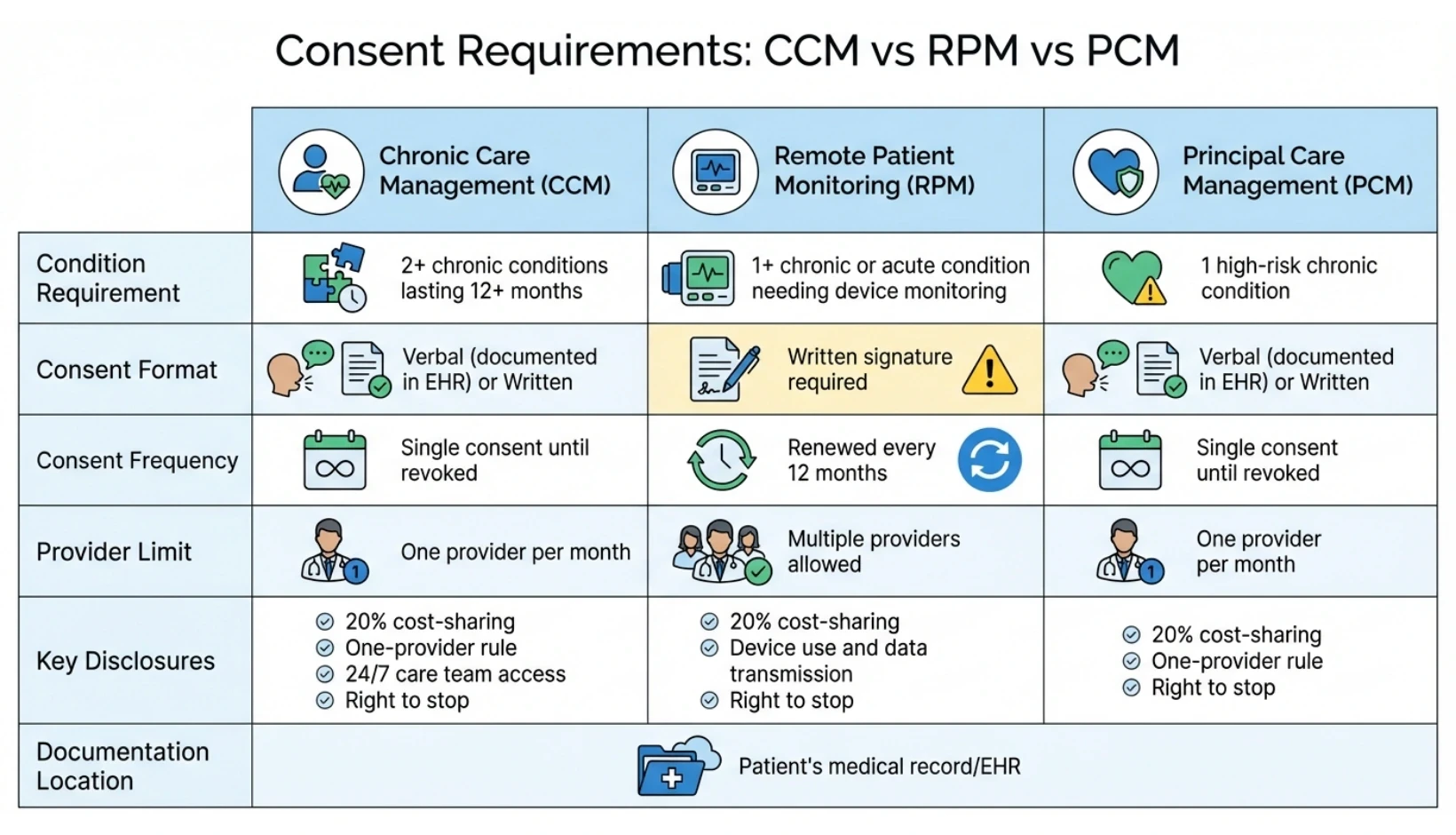
CCM vs RPM vs PCM Consent Requirements Comparison Chart

CCM vs RPM vs PCM Consent Requirements Comparison Chart

Patient consent is a key requirement for Chronic Care Management (CCM), Remote Patient Monitoring (RPM), and Principal Care Management (PCM) programs. However, the specifics of how consent is documented and maintained vary between these programs. Understanding these differences is critical to avoid billing errors and to ensure compliance during audits. Below is a detailed comparison to clarify the consent requirements for each program.

Program-by-Program Consent Comparison

The primary differences lie in how often consent must be updated and any restrictions on providers. For CCM and PCM, consent remains valid until the patient revokes it. In contrast, RPM requires patients to renew their consent every 12 months.

Feature

Chronic Care Management (CCM)

Remote Patient Monitoring (RPM)

Principal Care Management (PCM)

Condition Requirement

2+ chronic conditions lasting 12+ months

1+ chronic or acute condition needing device monitoring

1 high-risk chronic condition

Consent Format

Verbal (documented in EHR) or Written

Written signature required

Verbal (documented in EHR) or Written

Consent Frequency

Single consent until revoked

Renewed every 12 months

Single consent until revoked

Provider Limit

One provider per month

Multiple providers allowed

One provider per month

Key Disclosures

20% cost-sharing, one-provider rule, 24/7 care team access, right to stop

20% cost-sharing, device use and data transmission, right to stop

20% cost-sharing, one-provider rule, right to stop

Documentation Location

Patient's medical record/EHR

Patient's medical record/EHR

Patient's medical record/EHR

For CCM, consent must include information about 24/7 care team access, while RPM focuses on device usage and data transmission details. RPM’s requirement for annual consent renewal and its flexibility in allowing multiple providers make it distinct from CCM and PCM, which limit patients to one provider per month.

To maintain compliance, practices offering these programs need to ensure their consent processes are thorough and audit-ready. For CCM and PCM, it’s essential to confirm patients haven’t already enrolled with another provider, as only the first provider to submit a claim will be reimbursed. Patients are also responsible for avoiding duplicate enrollments. For RPM, while multiple providers can monitor the same patient, each must use separate devices and secure individual consent. These nuances help ensure clarity and compliance across all programs. Similar documentation standards apply to Transitional Care Management (TCM) services.

Key Takeaways for CMS-Compliant Consent

Documenting consent properly is a cornerstone of audit readiness, patient confidence, and ensuring reimbursement for care management services. The stakes are substantial - individuals with chronic conditions drive over 90% of Medicare spending, while programs like Chronic Care Management (CCM) save Medicare around $74 per patient each month. Securing accurate and thorough initial consent is non-negotiable.

Key components to focus on include: informing patients about the one-provider-per-month rule, clearly explaining the 20% coinsurance requirement, outlining their right to revoke consent, and ensuring consent is captured prospectively. Overlooking any of these elements can jeopardize compliance and leave documentation vulnerable during audits.

While verbal consent is acceptable, written consent provides stronger protection during audits. Always give patients a copy of their signed consent form and use your EHR to time-stamp all consent-related activities for added transparency.

Consent is more than just a checkbox - it’s a process of active communication that fosters trust and clarity. When patients fully understand their costs and their right to withdraw, they are more likely to actively participate in care management services. These services have been shown to decrease hospital admissions by 4.7% and emergency department visits by 2.3%. A well-executed consent process not only strengthens patient engagement but also reinforces the integrity of your care management documentation.

FAQs

  1. What happens if CMS consent documentation is incomplete?

    Incomplete CMS consent documentation can have significant repercussions for care management programs. These include compliance violations and the risk of audit failures, which, in turn, may lead to denied reimbursements, financial penalties, or even legal disputes, depending on the extent of non-compliance.

    To minimize these risks, it’s essential to ensure that all required elements - such as patient consent details, communication protocols, and accurate documentation practices - are thoroughly recorded and securely stored. Maintaining comprehensive records not only aligns with regulatory requirements but also enhances patient trust and supports smoother program operations.


  2. What’s the difference between verbal and written consent for CMS compliance?

    When it comes to meeting CMS requirements for obtaining a patient’s consent to use or share their protected health information, both verbal and written consent are acceptable options. However, they differ significantly in how they are documented and presented.

    Written consent is often regarded as the most reliable option because it involves a signed document - whether physical or electronic. This document includes key details such as the patient’s name, the recipient of the information, what specific information will be shared, and the patient’s signature. Its tangible nature makes it easy to file and retrieve during audits, providing a clear, traceable record.

    Verbal consent, while permissible, requires meticulous documentation in the patient’s medical record. This includes noting the date, time, and method of the conversation, identifying the individual who obtained the consent, and explicitly recording the patient’s agreement. Providers typically document this through detailed written notes or, in some cases, audio recordings. Because verbal consent lacks a physical signature, its validity depends entirely on the accuracy and thoroughness of the documentation.

    Regardless of the format, both types of consent must include the same fundamental information and be properly recorded in the patient’s chart to ensure compliance with CMS standards.


  3. What information needs to be documented for patient consent in CCM, RPM, and PCM programs?

    For Medicare-covered care management services such as Chronic Care Management (CCM), Remote Patient Monitoring (RPM), and Principal Care Management (PCM), obtaining and documenting patient consent is a critical requirement. This consent must be in written form, whether on paper or electronically, and should include essential details: the patient’s name, the individuals or entities authorized to access or disclose the information, a clear description of the information being shared, and the purpose of the disclosure.

    For CCM, consent is required only once and remains valid indefinitely unless the patient revokes it or there is a change in the billing provider. This consent must be documented in the patient’s medical record before initiating services. When it comes to RPM, the consent process must address specific elements, including the use of remote monitoring devices, the type of data being collected, and the patient’s agreement to participate in telehealth services. For PCM, the consent requirements align with those of CCM, focusing on the coordination and management of the patient’s primary chronic condition(s).

    In all scenarios, the consent must adhere to CMS guidelines and be thoroughly documented in the patient’s medical record to maintain compliance.

CCM vs RPM vs PCM Consent Requirements Comparison Chart

Patient consent is a key requirement for Chronic Care Management (CCM), Remote Patient Monitoring (RPM), and Principal Care Management (PCM) programs. However, the specifics of how consent is documented and maintained vary between these programs. Understanding these differences is critical to avoid billing errors and to ensure compliance during audits. Below is a detailed comparison to clarify the consent requirements for each program.

Program-by-Program Consent Comparison

The primary differences lie in how often consent must be updated and any restrictions on providers. For CCM and PCM, consent remains valid until the patient revokes it. In contrast, RPM requires patients to renew their consent every 12 months.

Feature

Chronic Care Management (CCM)

Remote Patient Monitoring (RPM)

Principal Care Management (PCM)

Condition Requirement

2+ chronic conditions lasting 12+ months

1+ chronic or acute condition needing device monitoring

1 high-risk chronic condition

Consent Format

Verbal (documented in EHR) or Written

Written signature required

Verbal (documented in EHR) or Written

Consent Frequency

Single consent until revoked

Renewed every 12 months

Single consent until revoked

Provider Limit

One provider per month

Multiple providers allowed

One provider per month

Key Disclosures

20% cost-sharing, one-provider rule, 24/7 care team access, right to stop

20% cost-sharing, device use and data transmission, right to stop

20% cost-sharing, one-provider rule, right to stop

Documentation Location

Patient's medical record/EHR

Patient's medical record/EHR

Patient's medical record/EHR

For CCM, consent must include information about 24/7 care team access, while RPM focuses on device usage and data transmission details. RPM’s requirement for annual consent renewal and its flexibility in allowing multiple providers make it distinct from CCM and PCM, which limit patients to one provider per month.

To maintain compliance, practices offering these programs need to ensure their consent processes are thorough and audit-ready. For CCM and PCM, it’s essential to confirm patients haven’t already enrolled with another provider, as only the first provider to submit a claim will be reimbursed. Patients are also responsible for avoiding duplicate enrollments. For RPM, while multiple providers can monitor the same patient, each must use separate devices and secure individual consent. These nuances help ensure clarity and compliance across all programs. Similar documentation standards apply to Transitional Care Management (TCM) services.

Key Takeaways for CMS-Compliant Consent

Documenting consent properly is a cornerstone of audit readiness, patient confidence, and ensuring reimbursement for care management services. The stakes are substantial - individuals with chronic conditions drive over 90% of Medicare spending, while programs like Chronic Care Management (CCM) save Medicare around $74 per patient each month. Securing accurate and thorough initial consent is non-negotiable.

Key components to focus on include: informing patients about the one-provider-per-month rule, clearly explaining the 20% coinsurance requirement, outlining their right to revoke consent, and ensuring consent is captured prospectively. Overlooking any of these elements can jeopardize compliance and leave documentation vulnerable during audits.

While verbal consent is acceptable, written consent provides stronger protection during audits. Always give patients a copy of their signed consent form and use your EHR to time-stamp all consent-related activities for added transparency.

Consent is more than just a checkbox - it’s a process of active communication that fosters trust and clarity. When patients fully understand their costs and their right to withdraw, they are more likely to actively participate in care management services. These services have been shown to decrease hospital admissions by 4.7% and emergency department visits by 2.3%. A well-executed consent process not only strengthens patient engagement but also reinforces the integrity of your care management documentation.

FAQs

  1. What happens if CMS consent documentation is incomplete?

    Incomplete CMS consent documentation can have significant repercussions for care management programs. These include compliance violations and the risk of audit failures, which, in turn, may lead to denied reimbursements, financial penalties, or even legal disputes, depending on the extent of non-compliance.

    To minimize these risks, it’s essential to ensure that all required elements - such as patient consent details, communication protocols, and accurate documentation practices - are thoroughly recorded and securely stored. Maintaining comprehensive records not only aligns with regulatory requirements but also enhances patient trust and supports smoother program operations.


  2. What’s the difference between verbal and written consent for CMS compliance?

    When it comes to meeting CMS requirements for obtaining a patient’s consent to use or share their protected health information, both verbal and written consent are acceptable options. However, they differ significantly in how they are documented and presented.

    Written consent is often regarded as the most reliable option because it involves a signed document - whether physical or electronic. This document includes key details such as the patient’s name, the recipient of the information, what specific information will be shared, and the patient’s signature. Its tangible nature makes it easy to file and retrieve during audits, providing a clear, traceable record.

    Verbal consent, while permissible, requires meticulous documentation in the patient’s medical record. This includes noting the date, time, and method of the conversation, identifying the individual who obtained the consent, and explicitly recording the patient’s agreement. Providers typically document this through detailed written notes or, in some cases, audio recordings. Because verbal consent lacks a physical signature, its validity depends entirely on the accuracy and thoroughness of the documentation.

    Regardless of the format, both types of consent must include the same fundamental information and be properly recorded in the patient’s chart to ensure compliance with CMS standards.


  3. What information needs to be documented for patient consent in CCM, RPM, and PCM programs?

    For Medicare-covered care management services such as Chronic Care Management (CCM), Remote Patient Monitoring (RPM), and Principal Care Management (PCM), obtaining and documenting patient consent is a critical requirement. This consent must be in written form, whether on paper or electronically, and should include essential details: the patient’s name, the individuals or entities authorized to access or disclose the information, a clear description of the information being shared, and the purpose of the disclosure.

    For CCM, consent is required only once and remains valid indefinitely unless the patient revokes it or there is a change in the billing provider. This consent must be documented in the patient’s medical record before initiating services. When it comes to RPM, the consent process must address specific elements, including the use of remote monitoring devices, the type of data being collected, and the patient’s agreement to participate in telehealth services. For PCM, the consent requirements align with those of CCM, focusing on the coordination and management of the patient’s primary chronic condition(s).

    In all scenarios, the consent must adhere to CMS guidelines and be thoroughly documented in the patient’s medical record to maintain compliance.

© 2026 OnCare360 Inc. All rights reserved.

Have questions?

Are you ready to explore the future of healthcare with OnCare360?

Contact us for more information or request a free consultation today.

© 2026 OnCare360 Inc. All rights reserved.

Have questions?

Are you ready to explore the future of healthcare with OnCare360?

Contact us for more information or request a free consultation today.

© 2026 OnCare360 Inc. All rights reserved.

Have questions?

Are you ready to explore the future of healthcare with OnCare360?

Contact us for more information or request a free consultation today.

© 2026 OnCare360 Inc. All rights reserved.

Have questions?

Are you ready to explore the future of healthcare with OnCare360?

Contact us for more information or request a free consultation today.

© 2026 OnCare360 Inc. All rights reserved.

Have questions?

Are you ready to explore the future of healthcare with OnCare360?

Contact us for more information or request a free consultation today.

© 2026 OnCare360 Inc. All rights reserved.

Have questions?

Are you ready to explore the future of healthcare with OnCare360?

Contact us for more information or request a free consultation today.