CMS 2026 RPM Documentation Checklist
OnCare360
Dec 25, 2025
Remote Patient Monitoring (RPM) is a vital component of between-visit care, enabling providers to monitor patient health remotely while improving outcomes and reimbursement opportunities. The 2026 CMS updates introduce new flexibility, such as shorter monitoring periods and reduced interaction time requirements, but demand stricter documentation to ensure compliance and prevent audit risks.
Physician groups, practice administrators, and value-based care leaders must address operational challenges like billing errors, inadequate proof of medical necessity, and device compliance. This article provides a clear framework for meeting CMS's 2026 RPM documentation standards, covering patient consent, device setup, time tracking, and audit readiness.
Key Takeaways:
Understand new CPT codes, including 99445 (2–15 days of monitoring) and 99470 (10-minute clinical management).
Learn how to document patient consent, FDA-cleared device use, and clinical time to meet CMS requirements.
Discover actionable steps to create audit-ready billing summaries and prevent revenue loss.
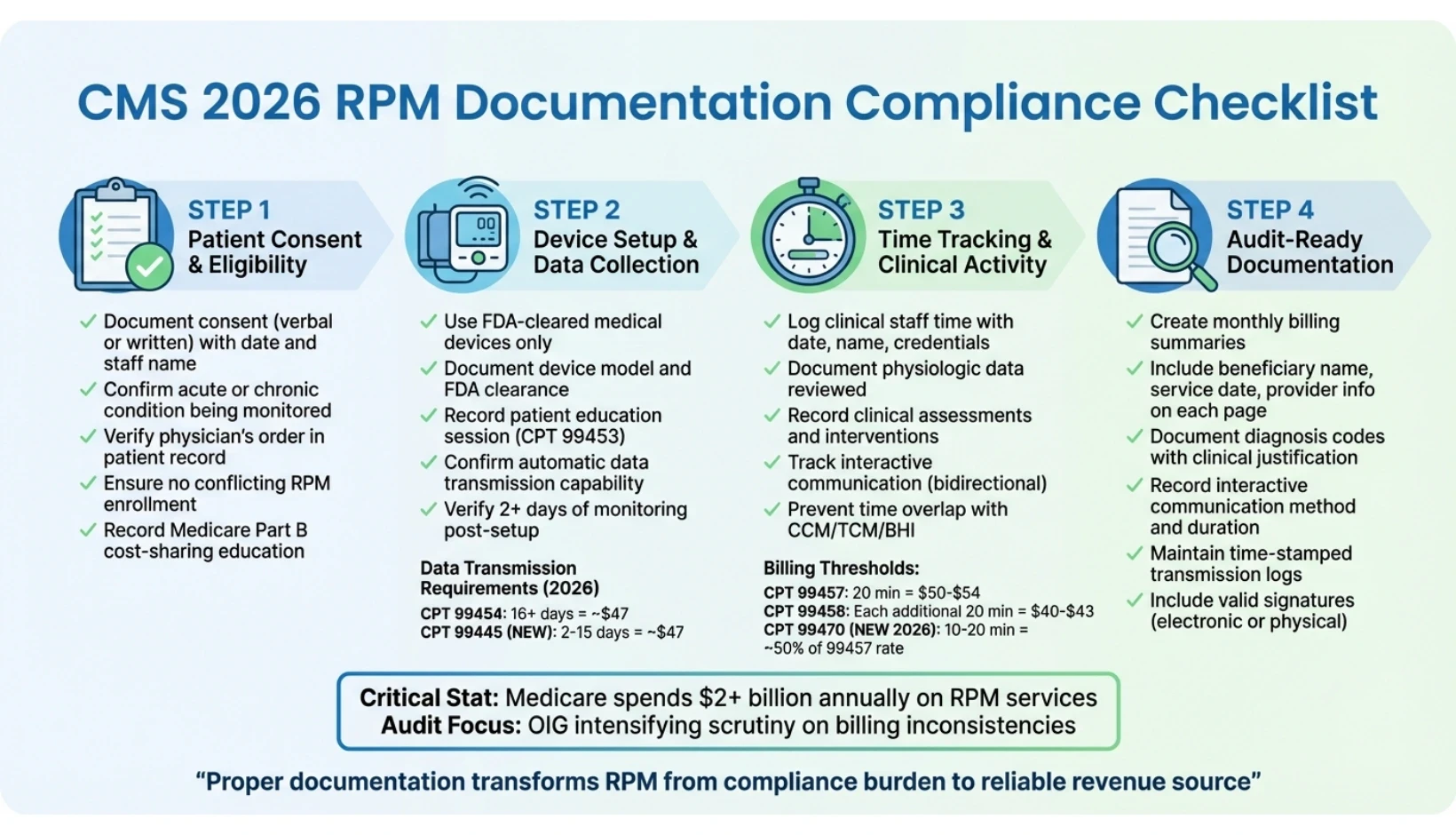
CMS 2026 RPM Documentation Compliance Checklist
Patient Consent and Eligibility Documentation
Before enrolling a patient in Remote Patient Monitoring (RPM), it's essential to document their consent, confirm an established patient-provider relationship, and verify medical necessity. The Centers for Medicare & Medicaid Services (CMS) mandates that consent be obtained at the start of services and recorded in the patient's medical record. This documentation must clearly identify the acute or chronic condition being monitored. Without these key elements, claims could face scrutiny during audits. Properly documenting consent details and verifying eligibility criteria are critical steps to ensure compliance.
Recording Patient Consent
Patient consent, whether verbal or written, should include the date, the name of the staff member who obtained it, and confirmation that the patient was informed about Medicare Part B cost-sharing. This includes educating the patient on device setup and usage, which is necessary for billing CPT 99453. Providing this education not only supports compliance but ensures the patient understands the service.
Consent forms should also clearly outline any copayments or deductibles, along with explanations for any non-standard abbreviations used in your electronic health record (EHR).
Confirming Patient Eligibility
After documenting consent, confirm that the patient meets RPM eligibility requirements. Starting in 2026, CMS will expand RPM eligibility to include short-term or episodic monitoring, such as for post-surgical recovery, medication adjustments, or sleep disorders. The monitored condition must be documented as either acute or chronic, and a physician's order should be included in the patient's record.
Your documentation must explain how the RPM data will be used to manage the specific condition, as this directly supports medical necessity - a key focus during audits. Additionally, confirm that the patient is not enrolled in another program that conflicts with RPM, as only one provider can bill for RPM services for a patient within the same month.
Device-Based Monitoring Criteria
To meet CMS billing requirements, the monitoring device must be FDA-cleared as a medical device and capable of automatically transmitting physiologic data. Examples of such data include blood pressure, glucose levels, weight, pulse oximetry, heart rate, respiratory rate, or ECG readings. Manual data entry or self-reporting by the patient does not qualify for billing. Only FDA-cleared devices prescribed by a provider and capable of automatic measurement and transmission meet these standards.
Document the specific device model being used and confirm its FDA clearance before initiating billing. Time-stamped transmission logs are essential to demonstrate that the required data thresholds were met - 16 unique days for standard RPM codes (CPT 99454) or 2 to 15 days for the new 2026 codes (CPT 99445). Thorough documentation of consent, eligibility, and device compliance serves as your primary safeguard against audit challenges.
Device Setup and Data Collection Standards
After confirming patient consent and eligibility, it's crucial to document the setup of RPM devices and provide thorough patient education. The Centers for Medicare & Medicaid Services (CMS) mandates that RPM devices must automatically transmit physiologic data securely. Proper documentation of these activities allows billing for CPT 99453 (initial onboarding) and either CPT 99454 or the new CPT 99445 (effective 2026) for device supply and monitoring. These records build on the consent and eligibility documentation completed earlier, ensuring smooth billing and compliance as your RPM program grows.
Recording Device Setup and Patient Education
When billing CPT 99453 for the initial setup and patient education, your documentation must include key details such as the date of the education session, the name and role of the staff member conducting the training, and confirmation that the patient was instructed on device usage, data collection, and data transmission. This service can be delivered by auxiliary personnel, including clinical staff like registered nurses or non-clinical staff, whether employed in-house or through a third-party vendor.
To meet the requirements for CPT 99453, the patient must complete at least two days of monitoring after the setup. This means your records should confirm that data was successfully transmitted on at least two separate days following the education session. Without this evidence, billing for the setup code is not permitted. Additionally, retain copies of any onboarding materials shared with the patient.
Data Transmission Requirements
Starting in 2026, CMS will implement a tiered system for data transmission. For standard monitoring, CPT 99454 requires 16 or more days of data transmission within a 30-day period, with reimbursement set at approximately $47. The newly introduced CPT 99445 allows billing for 2 to 15 days of data transmission within a 30-day period, also reimbursed at around $47.
Documentation must include time-stamped logs verifying each day data was received. These logs are essential as they serve as primary evidence during audits. Both CPT 99454 and CPT 99445 operate on a rolling 30-day cycle, meaning they can be billed every 30 days rather than once per calendar month. It's important to note that if a patient uses multiple devices on the same day - such as a blood pressure monitor and a weight scale - it counts as only one measurement day.
"For RPM, all device measurements must be digitally transmitted. Manual entries are not compliant." - Prevounce Health
FDA-Cleared Device Documentation
All RPM devices must comply with the FDA definition of a medical device as specified in Section 201(h) of the Federal Food, Drug, and Cosmetic Act. Before deploying any device, confirm that the manufacturer provides documentation verifying FDA clearance. Maintain records that include the device model number, FDA clearance status, and confirmation of internet connectivity.
These devices must automatically upload physiologic data, such as blood pressure, glucose levels, weight, pulse oximetry, heart rate, respiratory rate, or ECG readings. CMS explicitly prohibits manual data entry or self-reporting by patients for RPM billing. It's advisable to maintain a master list of FDA-cleared devices and update billing software to account for the new 2026 codes, including CPT 99445 for 2–15 days and CPT 99470 for 10-minute clinical management. This ensures you can capture revenue from patients who fall outside traditional monitoring thresholds.
Time Tracking and Clinical Activity Logs
Accurate time tracking is a cornerstone of compliance for Remote Patient Monitoring (RPM) billing. The Centers for Medicare & Medicaid Services (CMS) mandates that healthcare providers meticulously document the time clinical staff spend managing patient data, communicating with patients, and adjusting care plans. For CPT 99457, providers must log at least 20 minutes of clinical staff time per calendar month, with reimbursement typically ranging between $50 and $54. For every additional 20-minute increment, CPT 99458 can be billed, reimbursed at approximately $40 to $43. Starting in 2026, the introduction of CPT 99470 will allow billing for 10 to 20 minutes of clinical interaction, targeting patients who require less intensive monitoring. This new code is expected to reimburse at about 50% of the CPT 99457 rate. These time logs form the foundation for the detailed clinical activity records required in subsequent steps.
Documenting Clinical Staff Time
Time logs should capture key details, including the date of the activity, the name and credentials of the staff member involved, and a description of the clinical task performed. Examples of eligible activities include reviewing transmitted patient data, preparing communications, updating care plans, managing medications, and coordinating care. However, time spent on tasks like initial device setup (billed separately under CPT 99453), scheduling, or technical troubleshooting cannot be included toward the 20-minute threshold.
To meet the interactive communication requirement for CPT 99457, there must be at least one documented bidirectional exchange within the month. This could involve a phone call, video visit, or secure messaging session. Be sure to note the method and duration of the interaction (e.g., "10-minute phone call with patient discussing glucose trends") to meet audit standards. Recording activities in real time using start/stop timers can help reduce the risk of audit issues.
Recording Patient Assessments and Interventions
Every patient interaction should be documented to support clinical decision-making. Records must detail the specific physiologic data reviewed (e.g., blood pressure readings), the clinical assessment (e.g., elevated systolic readings indicating poor medication adherence), and the intervention performed (e.g., adjusting care plans, modifying medications, or issuing referrals). Using standardized templates can help ensure consistency in documenting data reviews, care plan changes, and time spent. For instance, if a patient gains five pounds in three days, the log should include the review date, the clinical concern (e.g., fluid retention), the action taken (e.g., medication adjustment), and the time spent. Keep in mind that CPT 99458 requires a full 20 minutes to bill - logging 19 minutes does not qualify. Detailed logs like these integrate smoothly into a broader RPM documentation framework.
Preventing Time Overlap with Other Programs
To maintain compliance, ensure that time logged for RPM is distinct and not double-counted with other care management programs. CMS prohibits using the same minute of clinical time for multiple programs. For instance, if billing for RPM alongside Chronic Care Management (CCM) billing, Transitional Care Management (TCM), or Behavioral Health Integration (BHI), maintain separate time logs for each program. For example, if a care coordinator spends 15 minutes reviewing RPM data and 25 minutes updating a CCM care plan in the same encounter, these activities should be logged as distinct entries. Keeping clear and separate records helps preserve audit trails and ensures adherence to CMS fraud prevention guidelines. Tools like automated timers and activity categorization can assist in creating defensible documentation and identifying any gaps before claims are submitted for review.
Billing and Audit-Ready Documentation
Once clinical activities are recorded, the next step is consolidating these records into a billing summary that meets audit-ready standards. CMS requires documentation to be organized systematically, with details clearly summarized and stored. Each page must include the beneficiary's name, service date, and provider information. Additionally, records should highlight the acute or chronic condition being monitored, along with supporting documentation for the billed diagnosis codes. This level of precision is essential for creating defensible claims and safeguarding practices during audits.
Creating Monthly Billing Summaries
Monthly billing summaries are essential for compiling all RPM activities into a single, audit-ready document that supports each submitted CPT code. For CPT codes like 99453 and 99454, ensure compliance with their specific requirements as outlined in earlier sections. Each CPT code entry should include:
Date of service
Staff credentials
Number of data transmission days (e.g., 16 days for CPT 99454, 2–15 days for CPT 99445)
Total interactive communication time (e.g., at least 20 minutes for CPT 99457, 10 minutes for CPT 99470, and full 20-minute increments for CPT 99458)
For every CPT code, document the service date, duration of interactive communication, physiologic data reviewed, and clinical decisions made. Include an abbreviation key for any non-standard acronyms used in the medical record. To meet authenticity requirements, ensure all progress notes include valid electronic or physical signatures.
Documenting Interactive Communication
Interactive communication must be real-time and bidirectional, with video as an optional enhancement. It is crucial to document that these interactions focus on RPM data interpretation and treatment management. Record the exact date and duration of each session, including start and stop times, and always note the name and credentials of the care team member involved.
When aggregating time to meet the 20-minute threshold for CPT 99457, you can combine time spent by different staff members or on different days within the same calendar month. However, individual sessions shorter than 20 minutes cannot be rounded up. Also, time spent on interactive communication cannot overlap with separate Evaluation and Management (E/M) services provided by the billing practitioner on the same day.
Using OnCare360 for Documentation and Compliance
OnCare360 streamlines RPM documentation by automating many administrative tasks, ensuring that records are audit-ready. This platform tracks clinical activity time in real time, generates detailed monthly billing summaries - including CPT codes, service dates, and revenue calculations - and maintains comprehensive logs of interactive communication. These logs capture the method, duration, and clinical content of each interaction, ensuring compliance with CMS standards.
OnCare360 integrates critical functions such as consent management, device data tracking, and eligibility checks into a single system. It ensures that every page of documentation includes required details like beneficiary identification, service dates, provider credentials, and clinical justification. The platform also prevents overlapping time logs with other care management programs, such as CCM or BHI, to maintain compliance. By automating these processes, OnCare360 helps practices minimize audit risks, reduce clawback potential, and improve clean-claim rates, ultimately accelerating revenue capture.
Conclusion
Adhering to CMS 2026 RPM documentation requirements is essential for safeguarding your practice, ensuring accurate reimbursements, and maintaining defensible care. With Medicare's annual spending on RPM services surpassing $2 billion and the Office of Inspector General intensifying its focus on billing inconsistencies, the importance of precise documentation cannot be overstated. By following the compliance steps outlined earlier, including proper recording of patient consent, device setup, data transmission logs, clinical time tracking, and interactive communication, you can create an audit-ready record to support every claim.
The 2026 updates introduce new CPT codes that allow for shorter interaction times and reduced data transmission requirements, offering greater billing flexibility. These adjustments reflect the varying levels of patient engagement seen in practice, but they demand meticulous and complete documentation to fully benefit from the changes.
"The 2026 final rule represents a tangible shift toward that goal, pairing clinical flexibility with improved financial stability." - Daniel Tashnek, JD, CEO, Prevounce
Platforms like OnCare360 simplify the documentation process by automating time tracking and ensuring claims are audit-ready. The system enforces payer guidelines, prevents overlapping time with other care management programs, and includes essential details such as beneficiary identification, service dates, and clinical justifications. By integrating real-time documentation workflows and automated compliance checks, practices can reduce audit risks and improve clean-claim rates.
A well-structured RPM program does more than meet CMS requirements - it supports both clinical and financial success. When documentation is thorough, organized, and audit-ready, RPM transitions from a compliance hurdle to a reliable revenue source, maximizing the impact of every patient interaction. For more insights on optimizing your digital health strategy, visit our learning center.
FAQs
What are the updated CPT codes for Remote Patient Monitoring (RPM) in 2026?
The Centers for Medicare & Medicaid Services (CMS) has announced two new CPT codes for Remote Patient Monitoring (RPM) that will take effect in 2026: 99445 and 99470. These additions aim to provide more precise billing options for RPM services, helping healthcare providers maintain compliance and secure accurate reimbursement.
To ensure proper use of these codes, healthcare providers should carefully review the updated guidelines. This includes understanding documentation requirements and identifying which services qualify under these codes. Keeping up with these changes is essential for smoother billing operations and enhanced audit preparedness.
What steps should I take to ensure my RPM documentation is ready for an audit?
To prepare your Remote Patient Monitoring (RPM) documentation for audits, treat it as a comprehensive clinical record that can stand on its own under Medicare or other audits. Begin by securing and properly storing signed patient consent forms, ensuring they outline the purpose of RPM, the type of data collected, and how it will support patient care. Document the education and device setup session in detail, noting the date, the staff member involved, the specific device used (e.g., connected blood pressure monitor or weight scale), and the patient’s ability to operate the device independently.
For billing compliance, make sure to log at least 16 transmitted readings within a 30-day period (or fewer if using codes for shorter intervals). Attach transmission logs or screenshots that include timestamps and recorded values. Add concise clinical notes summarizing data reviews, any treatment changes, and the time spent on clinician-patient interactions, such as 20 minutes for CPT 99457. Ensure these notes align with the correct CPT codes and billing dates.
Store all documentation - consent forms, transmission logs, and clinical notes - in a secure, HIPAA-compliant system. Keep these records for a minimum of seven years and perform regular internal audits to confirm adherence to CMS guidelines. By maintaining these practices, you can improve workflow efficiency, minimize audit risks, and optimize reimbursement processes.
What are the eligibility requirements for patients to enroll in Remote Patient Monitoring (RPM)?
To be eligible for Medicare-covered Remote Patient Monitoring (RPM), the patient must be enrolled in Medicare Part B and have a medical condition that can be tracked using an FDA-approved device. This device must be capable of automatically collecting and transmitting physiological data - such as blood pressure or glucose levels - without the need for manual input. Additionally, written consent from the patient is required before initiating RPM services.
Medicare mandates at least 16 days of device-generated data within a 30-day billing cycle to meet the criteria for supply and transmission codes, such as CPT 99454. However, this requirement does not apply to treatment-management codes like CPT 99457 or 99458. Patients must also be able to use the device independently or with the help of a caregiver to ensure data is collected accurately.
CMS 2026 RPM Documentation Compliance Checklist
Patient Consent and Eligibility Documentation
Before enrolling a patient in Remote Patient Monitoring (RPM), it's essential to document their consent, confirm an established patient-provider relationship, and verify medical necessity. The Centers for Medicare & Medicaid Services (CMS) mandates that consent be obtained at the start of services and recorded in the patient's medical record. This documentation must clearly identify the acute or chronic condition being monitored. Without these key elements, claims could face scrutiny during audits. Properly documenting consent details and verifying eligibility criteria are critical steps to ensure compliance.
Recording Patient Consent
Patient consent, whether verbal or written, should include the date, the name of the staff member who obtained it, and confirmation that the patient was informed about Medicare Part B cost-sharing. This includes educating the patient on device setup and usage, which is necessary for billing CPT 99453. Providing this education not only supports compliance but ensures the patient understands the service.
Consent forms should also clearly outline any copayments or deductibles, along with explanations for any non-standard abbreviations used in your electronic health record (EHR).
Confirming Patient Eligibility
After documenting consent, confirm that the patient meets RPM eligibility requirements. Starting in 2026, CMS will expand RPM eligibility to include short-term or episodic monitoring, such as for post-surgical recovery, medication adjustments, or sleep disorders. The monitored condition must be documented as either acute or chronic, and a physician's order should be included in the patient's record.
Your documentation must explain how the RPM data will be used to manage the specific condition, as this directly supports medical necessity - a key focus during audits. Additionally, confirm that the patient is not enrolled in another program that conflicts with RPM, as only one provider can bill for RPM services for a patient within the same month.
Device-Based Monitoring Criteria
To meet CMS billing requirements, the monitoring device must be FDA-cleared as a medical device and capable of automatically transmitting physiologic data. Examples of such data include blood pressure, glucose levels, weight, pulse oximetry, heart rate, respiratory rate, or ECG readings. Manual data entry or self-reporting by the patient does not qualify for billing. Only FDA-cleared devices prescribed by a provider and capable of automatic measurement and transmission meet these standards.
Document the specific device model being used and confirm its FDA clearance before initiating billing. Time-stamped transmission logs are essential to demonstrate that the required data thresholds were met - 16 unique days for standard RPM codes (CPT 99454) or 2 to 15 days for the new 2026 codes (CPT 99445). Thorough documentation of consent, eligibility, and device compliance serves as your primary safeguard against audit challenges.
Device Setup and Data Collection Standards
After confirming patient consent and eligibility, it's crucial to document the setup of RPM devices and provide thorough patient education. The Centers for Medicare & Medicaid Services (CMS) mandates that RPM devices must automatically transmit physiologic data securely. Proper documentation of these activities allows billing for CPT 99453 (initial onboarding) and either CPT 99454 or the new CPT 99445 (effective 2026) for device supply and monitoring. These records build on the consent and eligibility documentation completed earlier, ensuring smooth billing and compliance as your RPM program grows.
Recording Device Setup and Patient Education
When billing CPT 99453 for the initial setup and patient education, your documentation must include key details such as the date of the education session, the name and role of the staff member conducting the training, and confirmation that the patient was instructed on device usage, data collection, and data transmission. This service can be delivered by auxiliary personnel, including clinical staff like registered nurses or non-clinical staff, whether employed in-house or through a third-party vendor.
To meet the requirements for CPT 99453, the patient must complete at least two days of monitoring after the setup. This means your records should confirm that data was successfully transmitted on at least two separate days following the education session. Without this evidence, billing for the setup code is not permitted. Additionally, retain copies of any onboarding materials shared with the patient.
Data Transmission Requirements
Starting in 2026, CMS will implement a tiered system for data transmission. For standard monitoring, CPT 99454 requires 16 or more days of data transmission within a 30-day period, with reimbursement set at approximately $47. The newly introduced CPT 99445 allows billing for 2 to 15 days of data transmission within a 30-day period, also reimbursed at around $47.
Documentation must include time-stamped logs verifying each day data was received. These logs are essential as they serve as primary evidence during audits. Both CPT 99454 and CPT 99445 operate on a rolling 30-day cycle, meaning they can be billed every 30 days rather than once per calendar month. It's important to note that if a patient uses multiple devices on the same day - such as a blood pressure monitor and a weight scale - it counts as only one measurement day.
"For RPM, all device measurements must be digitally transmitted. Manual entries are not compliant." - Prevounce Health
FDA-Cleared Device Documentation
All RPM devices must comply with the FDA definition of a medical device as specified in Section 201(h) of the Federal Food, Drug, and Cosmetic Act. Before deploying any device, confirm that the manufacturer provides documentation verifying FDA clearance. Maintain records that include the device model number, FDA clearance status, and confirmation of internet connectivity.
These devices must automatically upload physiologic data, such as blood pressure, glucose levels, weight, pulse oximetry, heart rate, respiratory rate, or ECG readings. CMS explicitly prohibits manual data entry or self-reporting by patients for RPM billing. It's advisable to maintain a master list of FDA-cleared devices and update billing software to account for the new 2026 codes, including CPT 99445 for 2–15 days and CPT 99470 for 10-minute clinical management. This ensures you can capture revenue from patients who fall outside traditional monitoring thresholds.
Time Tracking and Clinical Activity Logs
Accurate time tracking is a cornerstone of compliance for Remote Patient Monitoring (RPM) billing. The Centers for Medicare & Medicaid Services (CMS) mandates that healthcare providers meticulously document the time clinical staff spend managing patient data, communicating with patients, and adjusting care plans. For CPT 99457, providers must log at least 20 minutes of clinical staff time per calendar month, with reimbursement typically ranging between $50 and $54. For every additional 20-minute increment, CPT 99458 can be billed, reimbursed at approximately $40 to $43. Starting in 2026, the introduction of CPT 99470 will allow billing for 10 to 20 minutes of clinical interaction, targeting patients who require less intensive monitoring. This new code is expected to reimburse at about 50% of the CPT 99457 rate. These time logs form the foundation for the detailed clinical activity records required in subsequent steps.
Documenting Clinical Staff Time
Time logs should capture key details, including the date of the activity, the name and credentials of the staff member involved, and a description of the clinical task performed. Examples of eligible activities include reviewing transmitted patient data, preparing communications, updating care plans, managing medications, and coordinating care. However, time spent on tasks like initial device setup (billed separately under CPT 99453), scheduling, or technical troubleshooting cannot be included toward the 20-minute threshold.
To meet the interactive communication requirement for CPT 99457, there must be at least one documented bidirectional exchange within the month. This could involve a phone call, video visit, or secure messaging session. Be sure to note the method and duration of the interaction (e.g., "10-minute phone call with patient discussing glucose trends") to meet audit standards. Recording activities in real time using start/stop timers can help reduce the risk of audit issues.
Recording Patient Assessments and Interventions
Every patient interaction should be documented to support clinical decision-making. Records must detail the specific physiologic data reviewed (e.g., blood pressure readings), the clinical assessment (e.g., elevated systolic readings indicating poor medication adherence), and the intervention performed (e.g., adjusting care plans, modifying medications, or issuing referrals). Using standardized templates can help ensure consistency in documenting data reviews, care plan changes, and time spent. For instance, if a patient gains five pounds in three days, the log should include the review date, the clinical concern (e.g., fluid retention), the action taken (e.g., medication adjustment), and the time spent. Keep in mind that CPT 99458 requires a full 20 minutes to bill - logging 19 minutes does not qualify. Detailed logs like these integrate smoothly into a broader RPM documentation framework.
Preventing Time Overlap with Other Programs
To maintain compliance, ensure that time logged for RPM is distinct and not double-counted with other care management programs. CMS prohibits using the same minute of clinical time for multiple programs. For instance, if billing for RPM alongside Chronic Care Management (CCM) billing, Transitional Care Management (TCM), or Behavioral Health Integration (BHI), maintain separate time logs for each program. For example, if a care coordinator spends 15 minutes reviewing RPM data and 25 minutes updating a CCM care plan in the same encounter, these activities should be logged as distinct entries. Keeping clear and separate records helps preserve audit trails and ensures adherence to CMS fraud prevention guidelines. Tools like automated timers and activity categorization can assist in creating defensible documentation and identifying any gaps before claims are submitted for review.
Billing and Audit-Ready Documentation
Once clinical activities are recorded, the next step is consolidating these records into a billing summary that meets audit-ready standards. CMS requires documentation to be organized systematically, with details clearly summarized and stored. Each page must include the beneficiary's name, service date, and provider information. Additionally, records should highlight the acute or chronic condition being monitored, along with supporting documentation for the billed diagnosis codes. This level of precision is essential for creating defensible claims and safeguarding practices during audits.
Creating Monthly Billing Summaries
Monthly billing summaries are essential for compiling all RPM activities into a single, audit-ready document that supports each submitted CPT code. For CPT codes like 99453 and 99454, ensure compliance with their specific requirements as outlined in earlier sections. Each CPT code entry should include:
Date of service
Staff credentials
Number of data transmission days (e.g., 16 days for CPT 99454, 2–15 days for CPT 99445)
Total interactive communication time (e.g., at least 20 minutes for CPT 99457, 10 minutes for CPT 99470, and full 20-minute increments for CPT 99458)
For every CPT code, document the service date, duration of interactive communication, physiologic data reviewed, and clinical decisions made. Include an abbreviation key for any non-standard acronyms used in the medical record. To meet authenticity requirements, ensure all progress notes include valid electronic or physical signatures.
Documenting Interactive Communication
Interactive communication must be real-time and bidirectional, with video as an optional enhancement. It is crucial to document that these interactions focus on RPM data interpretation and treatment management. Record the exact date and duration of each session, including start and stop times, and always note the name and credentials of the care team member involved.
When aggregating time to meet the 20-minute threshold for CPT 99457, you can combine time spent by different staff members or on different days within the same calendar month. However, individual sessions shorter than 20 minutes cannot be rounded up. Also, time spent on interactive communication cannot overlap with separate Evaluation and Management (E/M) services provided by the billing practitioner on the same day.
Using OnCare360 for Documentation and Compliance
OnCare360 streamlines RPM documentation by automating many administrative tasks, ensuring that records are audit-ready. This platform tracks clinical activity time in real time, generates detailed monthly billing summaries - including CPT codes, service dates, and revenue calculations - and maintains comprehensive logs of interactive communication. These logs capture the method, duration, and clinical content of each interaction, ensuring compliance with CMS standards.
OnCare360 integrates critical functions such as consent management, device data tracking, and eligibility checks into a single system. It ensures that every page of documentation includes required details like beneficiary identification, service dates, provider credentials, and clinical justification. The platform also prevents overlapping time logs with other care management programs, such as CCM or BHI, to maintain compliance. By automating these processes, OnCare360 helps practices minimize audit risks, reduce clawback potential, and improve clean-claim rates, ultimately accelerating revenue capture.
Conclusion
Adhering to CMS 2026 RPM documentation requirements is essential for safeguarding your practice, ensuring accurate reimbursements, and maintaining defensible care. With Medicare's annual spending on RPM services surpassing $2 billion and the Office of Inspector General intensifying its focus on billing inconsistencies, the importance of precise documentation cannot be overstated. By following the compliance steps outlined earlier, including proper recording of patient consent, device setup, data transmission logs, clinical time tracking, and interactive communication, you can create an audit-ready record to support every claim.
The 2026 updates introduce new CPT codes that allow for shorter interaction times and reduced data transmission requirements, offering greater billing flexibility. These adjustments reflect the varying levels of patient engagement seen in practice, but they demand meticulous and complete documentation to fully benefit from the changes.
"The 2026 final rule represents a tangible shift toward that goal, pairing clinical flexibility with improved financial stability." - Daniel Tashnek, JD, CEO, Prevounce
Platforms like OnCare360 simplify the documentation process by automating time tracking and ensuring claims are audit-ready. The system enforces payer guidelines, prevents overlapping time with other care management programs, and includes essential details such as beneficiary identification, service dates, and clinical justifications. By integrating real-time documentation workflows and automated compliance checks, practices can reduce audit risks and improve clean-claim rates.
A well-structured RPM program does more than meet CMS requirements - it supports both clinical and financial success. When documentation is thorough, organized, and audit-ready, RPM transitions from a compliance hurdle to a reliable revenue source, maximizing the impact of every patient interaction. For more insights on optimizing your digital health strategy, visit our learning center.
FAQs
What are the updated CPT codes for Remote Patient Monitoring (RPM) in 2026?
The Centers for Medicare & Medicaid Services (CMS) has announced two new CPT codes for Remote Patient Monitoring (RPM) that will take effect in 2026: 99445 and 99470. These additions aim to provide more precise billing options for RPM services, helping healthcare providers maintain compliance and secure accurate reimbursement.
To ensure proper use of these codes, healthcare providers should carefully review the updated guidelines. This includes understanding documentation requirements and identifying which services qualify under these codes. Keeping up with these changes is essential for smoother billing operations and enhanced audit preparedness.
What steps should I take to ensure my RPM documentation is ready for an audit?
To prepare your Remote Patient Monitoring (RPM) documentation for audits, treat it as a comprehensive clinical record that can stand on its own under Medicare or other audits. Begin by securing and properly storing signed patient consent forms, ensuring they outline the purpose of RPM, the type of data collected, and how it will support patient care. Document the education and device setup session in detail, noting the date, the staff member involved, the specific device used (e.g., connected blood pressure monitor or weight scale), and the patient’s ability to operate the device independently.
For billing compliance, make sure to log at least 16 transmitted readings within a 30-day period (or fewer if using codes for shorter intervals). Attach transmission logs or screenshots that include timestamps and recorded values. Add concise clinical notes summarizing data reviews, any treatment changes, and the time spent on clinician-patient interactions, such as 20 minutes for CPT 99457. Ensure these notes align with the correct CPT codes and billing dates.
Store all documentation - consent forms, transmission logs, and clinical notes - in a secure, HIPAA-compliant system. Keep these records for a minimum of seven years and perform regular internal audits to confirm adherence to CMS guidelines. By maintaining these practices, you can improve workflow efficiency, minimize audit risks, and optimize reimbursement processes.
What are the eligibility requirements for patients to enroll in Remote Patient Monitoring (RPM)?
To be eligible for Medicare-covered Remote Patient Monitoring (RPM), the patient must be enrolled in Medicare Part B and have a medical condition that can be tracked using an FDA-approved device. This device must be capable of automatically collecting and transmitting physiological data - such as blood pressure or glucose levels - without the need for manual input. Additionally, written consent from the patient is required before initiating RPM services.
Medicare mandates at least 16 days of device-generated data within a 30-day billing cycle to meet the criteria for supply and transmission codes, such as CPT 99454. However, this requirement does not apply to treatment-management codes like CPT 99457 or 99458. Patients must also be able to use the device independently or with the help of a caregiver to ensure data is collected accurately.
Jan 5, 2026
CMS Updates: How RPM is changing in 2026
Jan 3, 2026
How AI Expands Care Coordinator Capacity
Jan 1, 2026
RPM Time Tracking Errors That Lead to Denials
Dec 31, 2025
CMS Consent Documentation: What Must Be Captured
Jan 5, 2026
CMS Updates: How RPM is changing in 2026
Jan 3, 2026
How AI Expands Care Coordinator Capacity
Jan 1, 2026
RPM Time Tracking Errors That Lead to Denials
Dec 31, 2025
CMS Consent Documentation: What Must Be Captured
Dec 30, 2025
Top 10 Documentation Errors in CCM & RPM
Dec 29, 2025
Audit-Ready Documentation: What CMS Expects
Jan 5, 2026
CMS Updates: How RPM is changing in 2026
Jan 3, 2026
How AI Expands Care Coordinator Capacity
Jan 1, 2026
RPM Time Tracking Errors That Lead to Denials
Dec 31, 2025
CMS Consent Documentation: What Must Be Captured
Dec 30, 2025
Top 10 Documentation Errors in CCM & RPM
Dec 29, 2025
Audit-Ready Documentation: What CMS Expects


Have questions?
Are you ready to explore the future of healthcare with OnCare360?
Contact us for more information or request a free consultation today.
Have questions?
Are you ready to explore the future of healthcare with OnCare360?
Contact us for more information or request a free consultation today.
Have questions?
Are you ready to explore the future of healthcare with OnCare360?
Contact us for more information or request a free consultation today.
Have questions?
Are you ready to explore the future of healthcare with OnCare360?
Contact us for more information or request a free consultation today.
Have questions?
Are you ready to explore the future of healthcare with OnCare360?
Contact us for more information or request a free consultation today.
Have questions?